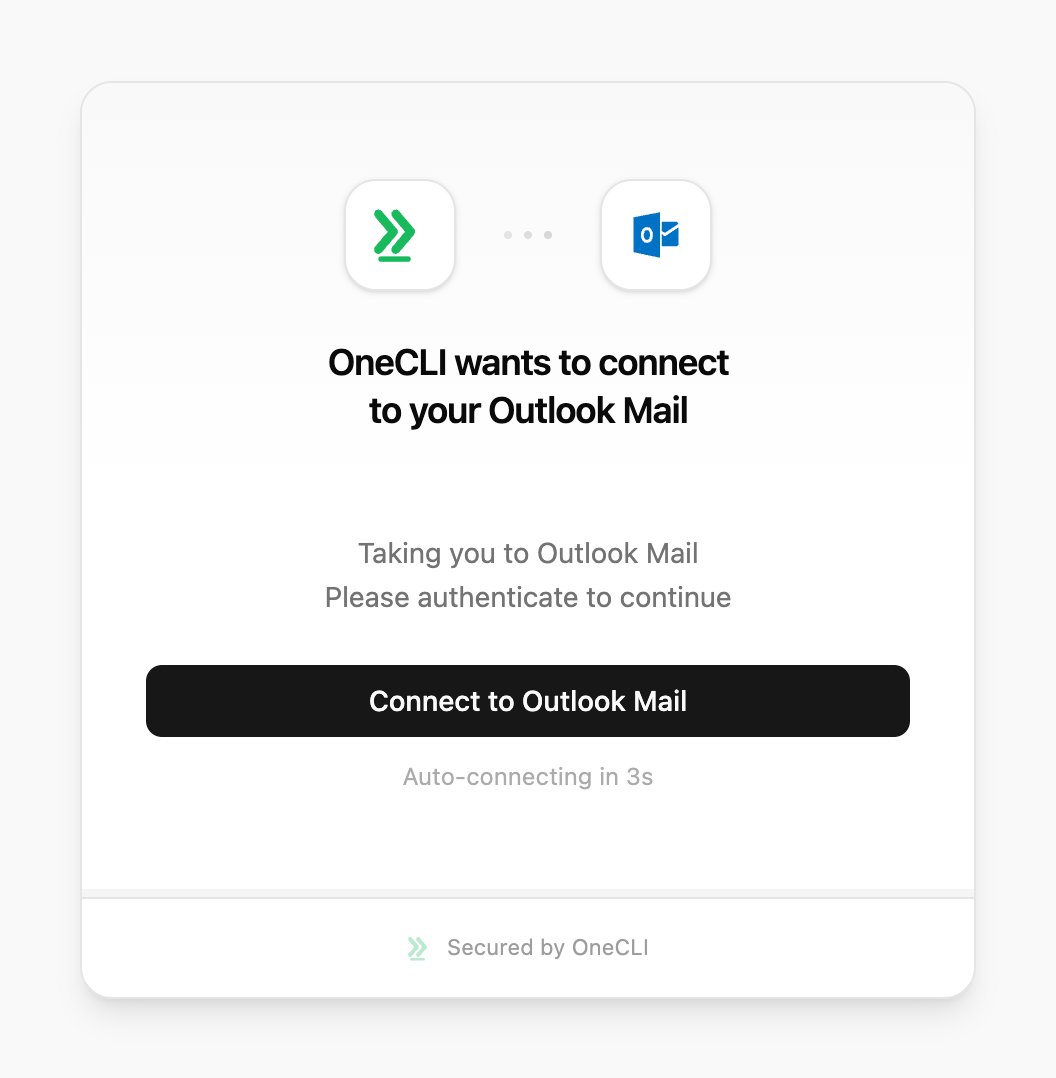
OneCLI connects AI agents to Outlook Mail through Microsoft’s OAuth flow. Agents can read your inbox, send emails, manage folders, and search messages. The gateway injects OAuth credentials into requests to the Microsoft Graph API automatically.This is useful for agents working in Microsoft 365 environments that need to process emails, send notifications, or automate inbox management.
Skip this section on OneCLI Cloud. It’s only for self-hosted OneCLI without MICROSOFT_CLIENT_ID and MICROSOFT_CLIENT_SECRET set. One Microsoft app serves Outlook Mail, Outlook Calendar, Microsoft Word, and Microsoft OneNote, so you set it up once.
1. Register the app
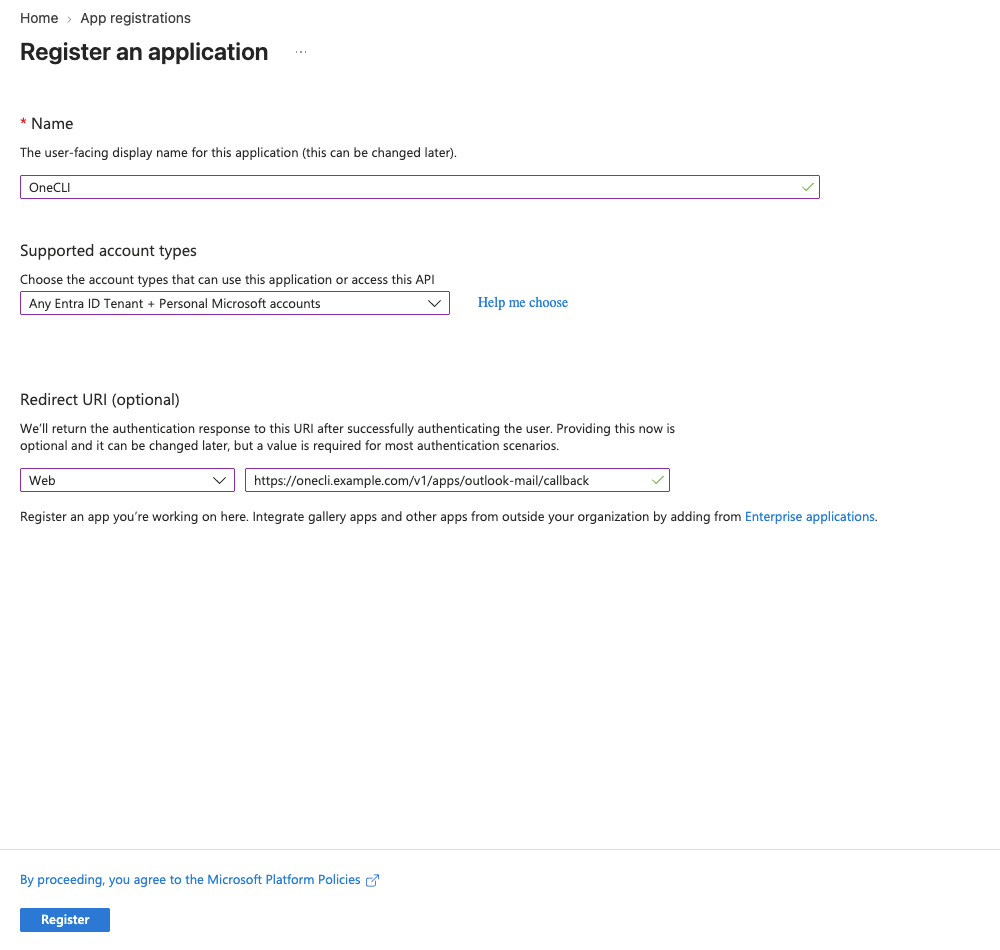
In the Microsoft Entra admin center, open Entra ID > App registrations > New registration. Name it OneCLI and, under Supported account types, choose Any Entra ID Tenant + Personal Microsoft accounts.
2. Add the redirect URI
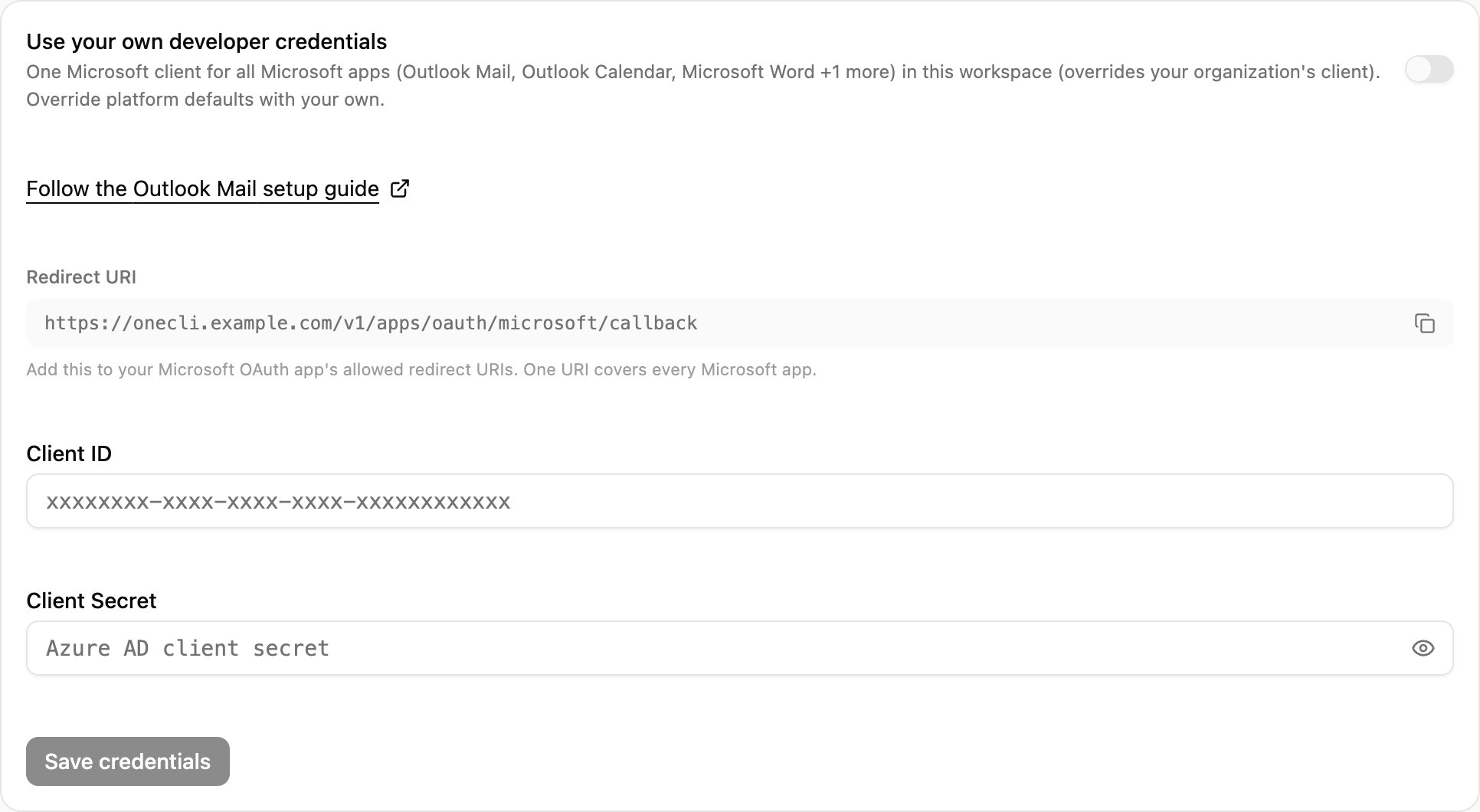
In OneCLI, open Connections > Outlook Mail > Custom credentials and copy the Redirect URI. In the registration form, set the platform to Web, paste the URI, and select Register.
The registration form: account type and the Web redirect URI.
Copy the Redirect URI from Custom credentials in OneCLI.
3. Add the API permissions
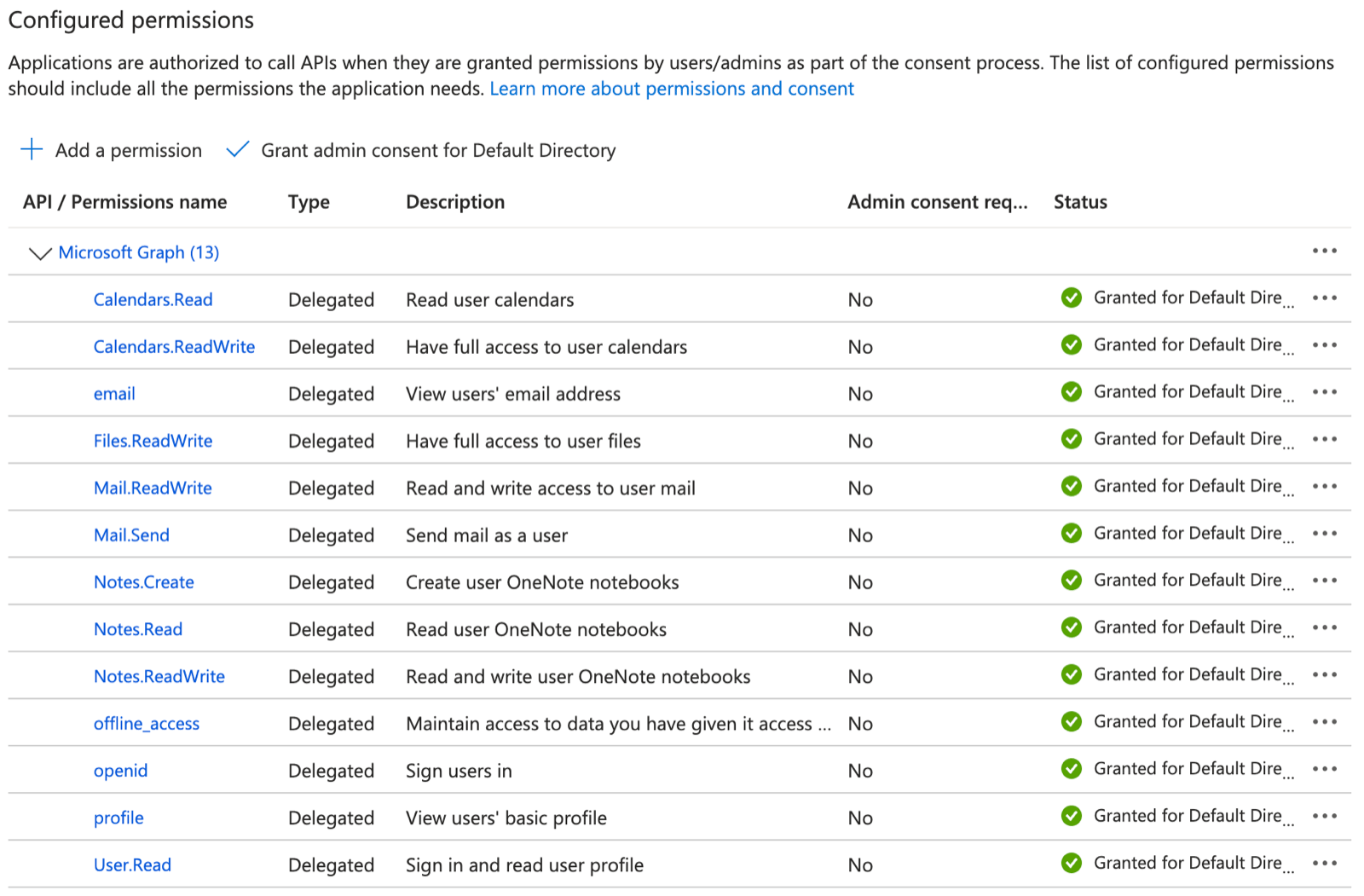
Open API permissions > Add a permission > Microsoft Graph > Delegated permissions and add:
App
Permissions
All
User.Read, offline_access
Outlook Mail
Mail.ReadWrite, Mail.Send
Outlook Calendar
Calendars.ReadWrite
Microsoft Word
Files.ReadWrite
Microsoft OneNote
Notes.Read, Notes.ReadWrite, Notes.Create
API permissions after adding the Microsoft Graph delegated permissions. Extra ones such as openid and email are harmless.
4. Connect with your app
Copy the Application (client) ID from Overview. Open Certificates & secrets > New client secret and copy its Value (shown once). Paste both into Connections > Outlook Mail > Custom credentials, select Save & Connect, and accept in Microsoft.
Access is per agent: grant the connection to each agent that needs it, choosing per tool what runs freely, what needs human approval, and what stays blocked — a read-only agent is a single grant. Organization rules add guardrails on top, like rate limits and blanket blocks. Everything is checked before credential injection, so a blocked request never reaches Microsoft Graph.
Yes. When you grant the connection, allow the read tools and block or require approval for sending.
Does the agent see my Microsoft token?
No. The token stays in OneCLI, and the gateway adds it to Microsoft Graph requests at the proxy. See How it works.
Does one Microsoft app cover Outlook Calendar and Word too?
Yes, on self-hosted. One Microsoft app serves Outlook Mail, Outlook Calendar, Microsoft Word, and Microsoft OneNote. See Self-hosted.
How do I reconnect Outlook Mail?
Open Connections > Outlook Mail and connect again. Agents with access use the new connection automatically.
{"docsConfig":{"theme":"mint","$schema":"https://mintlify.com/docs.json","name":"OneCLI","colors":{"primary":"#19BA5D","light":"#34D474","dark":"#128A45"},"logo":{"light":"https://mintcdn.com/chartdbinc/3IvBQeNyWpN0X2ob/logo/logo-full-light.svg?fit=max\u0026auto=format\u0026n=3IvBQeNyWpN0X2ob\u0026q=85\u0026s=630ee6bb5c7441548135c690b3e18d35","dark":"https://mintcdn.com/chartdbinc/3IvBQeNyWpN0X2ob/logo/logo-full-dark.svg?fit=max\u0026auto=format\u0026n=3IvBQeNyWpN0X2ob\u0026q=85\u0026s=c80db357e121f4676dba423c01304258","href":"/"},"favicon":"https://mintcdn.com/chartdbinc/wh8636A1-I7XVdgP/favicon.png?fit=max\u0026auto=format\u0026n=wh8636A1-I7XVdgP\u0026q=85\u0026s=71b6d9b7afc7659e690354e389db9da8","appearance":{"default":"light"},"background":{"color":{"light":"#FAFAF9","dark":"#1A1918"}},"navbar":{"links":[{"href":"https://github.com/onecli/onecli","label":"GitHub"},{"href":"https://onecli.sh","label":"Install"}]},"footer":{"socials":{"github":"https://github.com/onecli"}},"fonts":{"heading":{"family":"Overused Grotesk","weight":600,"source":"fonts/OverusedGroteskRoman-VF.woff2","format":"woff2"}},"contextual":{"options":["copy","view","chatgpt","claude","perplexity","mcp","cursor","vscode"],"display":"header"},"styling":{"latex":false},"navigation":{"global":{"anchors":[{"anchor":"GitHub","icon":"https://mintlify.s3.us-west-1.amazonaws.com/chartdbinc/images/github.svg","href":"https://github.com/onecli"}]},"pages":[]}},"deployment":{"deploymentMetadataValue":{"subdomain":"chartdbinc","hasAudioNarration":false,"actualSubdomain":"chartdbinc","customDomains":["onecli.sh"],"gitSource":{"type":"github","owner":"onecli","repo":"onecli-docs","deployBranch":"main","contentDirectory":"","isPrivate":true,"mountPath":"","label":""},"chroma":{"liveDeploymentHistoryId":"6ae93dff859b9b27a0220555","collectionId":"4253288a-7e3f-4857-a015-60ff48e38182","schemaVersion":"v3","latestBuiltDeploymentHistoryId":"6ae93dff859b9b27a0220555"},"entitlements":{},"buildId":"6aed6ecd1adb743cd28e52b5","clientVersion":"0.0.4074","searchFilterCounts":[{"language":"default","tag":"API Reference","count":240},{"language":"default","tag":"Workspace","count":105},{"language":"default","tag":"Integrations","count":88},{"language":"default","tag":"All app connections","count":64},{"language":"default","tag":"Enterprise","count":57},{"language":"default","tag":"Organization","count":52},{"language":"default","tag":"Apps","count":29},{"language":"default","tag":"Channels","count":28},{"language":"default","tag":"Platform","count":21},{"language":"default","tag":"Guides","count":17}]},"assistantConfig":{"enableAskAiButton":false,"enableStarterQuestions":false,"enableAskAiSearchBar":true},"basePath":"/docs","hasChatPermissions":false,"hasWebMcpPermissions":false,"toggles":[{"name":"kill-isr","enabled":true,"variant":{"name":"disabled","enabled":false,"feature_enabled":true},"impressionData":false},{"name":"agent-mintlify-slack","enabled":true,"variant":{"name":"disabled","enabled":false,"feature_enabled":true},"impressionData":false},{"name":"agent-integrations-settings","enabled":true,"variant":{"name":"disabled","enabled":false,"feature_enabled":true},"impressionData":false},{"name":"rbac-expansion","enabled":true,"variant":{"name":"disabled","enabled":false,"feature_enabled":true},"impressionData":false},{"name":"automations-pr-grouping","enabled":true,"variant":{"name":"disabled","enabled":false,"feature_enabled":true},"impressionData":false},{"name":"custom-prefix","enabled":true,"variant":{"name":"disabled","enabled":false,"feature_enabled":true},"impressionData":false},{"name":"analytics-v7","enabled":true,"variant":{"name":"disabled","enabled":false,"feature_enabled":true},"impressionData":false},{"name":"user-flows-analytics","enabled":true,"variant":{"name":"disabled","enabled":false,"feature_enabled":true},"impressionData":false},{"name":"no-publish-flow","enabled":true,"variant":{"name":"disabled","enabled":false,"feature_enabled":true},"impressionData":false},{"name":"workos-onboarding","enabled":true,"variant":{"name":"disabled","enabled":false,"feature_enabled":true},"impressionData":false},{"name":"llms-txt-v2","enabled":true,"variant":{"name":"disabled","enabled":false,"feature_enabled":true},"impressionData":false},{"name":"snapshot-serving-live","enabled":true,"variant":{"name":"disabled","enabled":false,"feature_enabled":true},"impressionData":false},{"name":"stripTemperatureMiddleware","enabled":true,"variant":{"name":"disabled","enabled":false,"feature_enabled":true},"impressionData":false},{"name":"support-platform-pylon-zendesk","enabled":true,"variant":{"name":"disabled","enabled":false,"feature_enabled":true},"impressionData":false},{"name":"snapshot-serving","enabled":true,"variant":{"name":"disabled","enabled":false,"feature_enabled":true},"impressionData":false},{"name":"instant-rollback","enabled":true,"variant":{"name":"disabled","enabled":false,"feature_enabled":true},"impressionData":false},{"name":"granular-notifications-server","enabled":true,"variant":{"name":"disabled","enabled":false,"feature_enabled":true},"impressionData":false},{"name":"granular-notifications","enabled":true,"variant":{"name":"disabled","enabled":false,"feature_enabled":true},"impressionData":false},{"name":"automations-fable","enabled":true,"variant":{"name":"disabled","enabled":false,"feature_enabled":true},"impressionData":false},{"name":"fixed-ai-action-pricing","enabled":true,"variant":{"name":"disabled","enabled":false,"feature_enabled":true},"impressionData":false},{"name":"automation-resolve-merge-conflict","enabled":true,"variant":{"name":"disabled","enabled":false,"feature_enabled":true},"impressionData":false},{"name":"scoped-publishing","enabled":true,"variant":{"name":"disabled","enabled":false,"feature_enabled":true},"impressionData":false},{"name":"mintql","enabled":true,"variant":{"name":"disabled","enabled":false,"feature_enabled":true},"impressionData":false},{"name":"page-level-analytics","enabled":true,"variant":{"name":"disabled","enabled":false,"feature_enabled":true},"impressionData":false},{"name":"editor-version-history-v2","enabled":true,"variant":{"name":"disabled","enabled":false,"feature_enabled":true},"impressionData":false},{"name":"billing-page-v2","enabled":true,"variant":{"name":"disabled","enabled":false,"feature_enabled":true},"impressionData":false},{"name":"full-page-search","enabled":true,"variant":{"name":"disabled","enabled":false,"feature_enabled":true},"impressionData":false},{"name":"workspace-projects","enabled":true,"variant":{"name":"disabled","enabled":false,"feature_enabled":true},"impressionData":false},{"name":"assistant-v5","enabled":true,"variant":{"name":"disabled","enabled":false,"feature_enabled":true},"impressionData":false},{"name":"fork-pr-previews","enabled":true,"variant":{"name":"disabled","enabled":false,"feature_enabled":true},"impressionData":false},{"name":"revalidation-jwt","enabled":true,"variant":{"name":"disabled","enabled":false,"feature_enabled":true},"impressionData":false},{"name":"vite-origin","enabled":true,"variant":{"name":"disabled","enabled":false,"feature_enabled":true},"impressionData":false},{"name":"workos-sso-scim","enabled":true,"variant":{"name":"disabled","enabled":false,"feature_enabled":true},"impressionData":false},{"name":"hobby-abuse-scan","enabled":true,"variant":{"name":"disabled","enabled":false,"feature_enabled":true},"impressionData":false},{"name":"dashboard-inbox","enabled":true,"variant":{"name":"disabled","enabled":false,"feature_enabled":true},"impressionData":false},{"name":"workos-signup","enabled":true,"variant":{"name":"disabled","enabled":false,"feature_enabled":true},"impressionData":false},{"name":"turbopuffer-dual-write","enabled":true,"variant":{"name":"disabled","enabled":false,"feature_enabled":true},"impressionData":false},{"name":"workos-enabled","enabled":true,"variant":{"name":"disabled","enabled":false,"feature_enabled":true},"impressionData":false},{"name":"approve-review-flow","enabled":true,"variant":{"name":"disabled","enabled":false,"feature_enabled":true},"impressionData":false},{"name":"sso-setup-deadline-banner","enabled":true,"variant":{"name":"disabled","enabled":false,"feature_enabled":true},"impressionData":false},{"name":"turbopuffer-serve","enabled":true,"variant":{"name":"disabled","enabled":false,"feature_enabled":true},"impressionData":false},{"name":"live-agents","enabled":true,"variant":{"name":"disabled","enabled":false,"feature_enabled":true},"impressionData":false},{"name":"comment-mode","enabled":true,"variant":{"name":"disabled","enabled":false,"feature_enabled":true},"impressionData":false}],"googleFontsInlined":false},"customCss":[{"filePath":"style.css","content":"a.nav-anchor div.mr-4.rounded-md{--tw-ring-color: transparent !important;--tw-ring-shadow: 0 0 0 0 transparent !important;--tw-ring-offset-shadow: 0 0 0 0 transparent !important;box-shadow:none!important;background:transparent!important;filter:none!important;transition:opacity 0.15s ease!important}a.nav-anchor:hover div.mr-4.rounded-md{--tw-ring-color: transparent !important;--tw-ring-shadow: 0 0 0 0 transparent !important;--tw-ring-offset-shadow: 0 0 0 0 transparent !important;box-shadow:none!important;background:transparent!important;filter:none!important;opacity:0.7!important}a.nav-anchor div.mr-4.rounded-md img{opacity:1!important;filter:none!important;background:transparent!important}a.nav-anchor:hover div.mr-4.rounded-md img{opacity:1!important;filter:none!important;background:transparent!important}.dark a.nav-anchor div.mr-4.rounded-md img,[data-theme=\"dark\"] a.nav-anchor div.mr-4.rounded-md img{filter:invert(1)!important}"}],"page":{"pagePath":"integrations/outlook-mail","slug":"/integrations/outlook-mail","pageMetadata":{"title":"Connect AI Agents to Outlook Mail in Microsoft 365","sidebarTitle":"Outlook Mail","description":"Let agents read, search, send, and organize Outlook email in Microsoft 365. The gateway injects and refreshes OAuth tokens so agents never see them.","canonical":"https://onecli.sh/docs/integrations/outlook-mail","href":"/integrations/outlook-mail"},"description":{"compiledSource":"\"use strict\";\nconst {jsx: _jsx} = arguments[0];\nconst {useMDXComponents: _provideComponents} = arguments[0];\nfunction _createMdxContent(props) {\n const _components = {\n p: \"p\",\n ..._provideComponents(),\n ...props.components\n };\n return _jsx(_components.p, {\n children: \"Let agents read, search, send, and organize Outlook email in Microsoft 365. The gateway injects and refreshes OAuth tokens so agents never see them.\"\n });\n}\nfunction MDXContent(props = {}) {\n const {wrapper: MDXLayout} = {\n ..._provideComponents(),\n ...props.components\n };\n return MDXLayout ? _jsx(MDXLayout, {\n ...props,\n children: _jsx(_createMdxContent, {\n ...props\n })\n }) : _createMdxContent(props);\n}\nreturn {\n default: MDXContent\n};\n","frontmatter":{},"scope":{}},"pageType":"default","mdx":{"mdxSource":{"compiledSource":"\"use strict\";const{Fragment:_Fragment,jsx:_jsx,jsxs:_jsxs}=arguments[0];const{useMDXComponents:_provideComponents}=arguments[0];function _createMdxContent(props){const _components={a:`a`,code:`code`,li:`li`,p:`p`,strong:`strong`,tbody:`tbody`,td:`td`,th:`th`,thead:`thead`,tr:`tr`,ul:`ul`,..._provideComponents(),...props.components},{Accordion,AccordionGroup,Frame,Heading,Info,Note,OptimizedImage,Step,Steps,Table}=_components;if(!Accordion)_missingMdxReference(`Accordion`,true);if(!AccordionGroup)_missingMdxReference(`AccordionGroup`,true);if(!Frame)_missingMdxReference(`Frame`,true);if(!Heading)_missingMdxReference(`Heading`,true);if(!Info)_missingMdxReference(`Info`,true);if(!Note)_missingMdxReference(`Note`,true);if(!OptimizedImage)_missingMdxReference(`OptimizedImage`,true);if(!Step)_missingMdxReference(`Step`,true);if(!Steps)_missingMdxReference(`Steps`,true);if(!Table)_missingMdxReference(`Table`,true);return _jsxs(_Fragment,{children:[_jsx(Note,{children:_jsxs(_components.p,{children:[`On self-hosted OneCLI, Outlook Mail needs your own Microsoft app first. See `,_jsx(_components.a,{href:`#self-hosted`,children:`Self-hosted`}),`.`]})}),`\n`,_jsx(Heading,{level:`2`,id:`overview`,children:`Overview`}),`\n`,_jsx(_components.p,{children:`OneCLI connects AI agents to Outlook Mail through Microsoft’s OAuth flow. Agents can read your inbox, send emails, manage folders, and search messages. The gateway injects OAuth credentials into requests to the Microsoft Graph API automatically.`}),`\n`,_jsx(_components.p,{children:`This is useful for agents working in Microsoft 365 environments that need to process emails, send notifications, or automate inbox management.`}),`\n`,_jsx(Heading,{level:`2`,id:`what-you-will-set-up`,children:`What you will set up`}),`\n`,_jsxs(_components.ul,{children:[`\n`,_jsx(_components.li,{children:`An Outlook Mail connection through Microsoft OAuth`}),`\n`,_jsx(_components.li,{children:`Automatic token injection on requests to Microsoft Graph`}),`\n`,_jsx(_components.li,{children:`Per-agent, per-tool access, such as read freely and approve sends`}),`\n`]}),`\n`,_jsx(Heading,{level:`2`,id:`setup`,children:`Setup`}),`\n`,_jsxs(Steps,{children:[_jsx(Step,{title:`Go to Connections`,children:_jsxs(_components.p,{children:[`Open the OneCLI dashboard and navigate to `,_jsx(_components.strong,{children:`Connections`}),` > `,_jsx(_components.strong,{children:`Outlook Mail`}),`.`]})}),_jsxs(Step,{title:`Authorize`,children:[_jsxs(_components.p,{children:[`Click `,_jsx(_components.strong,{children:`Connect Outlook`}),`. You’ll be redirected to Microsoft to sign in and authorize OneCLI. Review the permissions and click `,_jsx(_components.strong,{children:`Accept`}),`.`]}),_jsx(Frame,{caption:`The Outlook Mail connect window on OneCLI Cloud.`,children:_jsx(OptimizedImage,{src:`https://mintcdn.com/chartdbinc/yFw2bbdvTPdZgMOT/images/integrations/outlook-mail/onecli-connect-outlook-mail.png?fit=max\u0026auto=format\u0026n=yFw2bbdvTPdZgMOT\u0026q=85\u0026s=a5e2d8da9507ce5e4ca33958aa048091`,alt:`OneCLI connect window for Outlook Mail on Cloud, showing the Connect to Outlook Mail button.`,\"data-og-width\":`1056`,width:`1056`,\"data-og-height\":`1078`,height:`1078`,\"data-path\":`images/integrations/outlook-mail/onecli-connect-outlook-mail.png`,\"data-optimize\":`true`,\"data-opv\":`3`,srcset:`https://mintcdn.com/chartdbinc/yFw2bbdvTPdZgMOT/images/integrations/outlook-mail/onecli-connect-outlook-mail.png?w=280\u0026fit=max\u0026auto=format\u0026n=yFw2bbdvTPdZgMOT\u0026q=85\u0026s=1da9f4ed77027d4c638fb2b0e85d7c92 280w, https://mintcdn.com/chartdbinc/yFw2bbdvTPdZgMOT/images/integrations/outlook-mail/onecli-connect-outlook-mail.png?w=560\u0026fit=max\u0026auto=format\u0026n=yFw2bbdvTPdZgMOT\u0026q=85\u0026s=aa6db448fa4b21453973a7f0ac8d8f40 560w, https://mintcdn.com/chartdbinc/yFw2bbdvTPdZgMOT/images/integrations/outlook-mail/onecli-connect-outlook-mail.png?w=840\u0026fit=max\u0026auto=format\u0026n=yFw2bbdvTPdZgMOT\u0026q=85\u0026s=6fb4b63ad95965ed0deca7dd6eec36ae 840w, https://mintcdn.com/chartdbinc/yFw2bbdvTPdZgMOT/images/integrations/outlook-mail/onecli-connect-outlook-mail.png?w=1100\u0026fit=max\u0026auto=format\u0026n=yFw2bbdvTPdZgMOT\u0026q=85\u0026s=5b914493f4cd52bd7555f5d1b6bcb4a3 1100w, https://mintcdn.com/chartdbinc/yFw2bbdvTPdZgMOT/images/integrations/outlook-mail/onecli-connect-outlook-mail.png?w=1650\u0026fit=max\u0026auto=format\u0026n=yFw2bbdvTPdZgMOT\u0026q=85\u0026s=ee4901cd3da8f6444f422090431d1ff3 1650w, https://mintcdn.com/chartdbinc/yFw2bbdvTPdZgMOT/images/integrations/outlook-mail/onecli-connect-outlook-mail.png?w=2500\u0026fit=max\u0026auto=format\u0026n=yFw2bbdvTPdZgMOT\u0026q=85\u0026s=8bc631dd6e5a8ba8afa4887a2bf44d12 2500w`})})]})]}),`\n`,_jsx(`a`,{id:`self-hosted`,style:{scrollMarginTop:`8rem`}}),`\n`,_jsx(Heading,{level:`2`,id:`self-hosted-use-your-own-microsoft-app`,children:`Self-hosted: use your own Microsoft app`}),`\n`,_jsx(Info,{children:_jsxs(_components.p,{children:[_jsx(_components.strong,{children:`Skip this section on OneCLI Cloud.`}),` It’s only for self-hosted OneCLI without `,_jsx(_components.code,{children:`MICROSOFT_CLIENT_ID`}),` and `,_jsx(_components.code,{children:`MICROSOFT_CLIENT_SECRET`}),` set. One Microsoft app serves Outlook Mail, Outlook Calendar, Microsoft Word, and Microsoft OneNote, so you set it up once.`]})}),`\n`,_jsxs(AccordionGroup,{children:[_jsx(Accordion,{title:`1. Register the app`,defaultOpen:true,id:`1-register-the-app`,children:_jsxs(_components.p,{children:[`In the `,_jsx(_components.a,{href:`https://entra.microsoft.com/`,children:`Microsoft Entra admin center`}),`, open `,_jsx(_components.strong,{children:`Entra ID`}),` > `,_jsx(_components.strong,{children:`App registrations`}),` > `,_jsx(_components.strong,{children:`New registration`}),`. Name it `,_jsx(_components.code,{children:`OneCLI`}),` and, under `,_jsx(_components.strong,{children:`Supported account types`}),`, choose `,_jsx(_components.strong,{children:`Any Entra ID Tenant + Personal Microsoft accounts`}),`.`]})}),_jsxs(Accordion,{title:`2. Add the redirect URI`,id:`2-add-the-redirect-uri`,children:[_jsxs(_components.p,{children:[`In OneCLI, open `,_jsx(_components.strong,{children:`Connections`}),` > `,_jsx(_components.strong,{children:`Outlook Mail`}),` > `,_jsx(_components.strong,{children:`Custom credentials`}),` and copy the `,_jsx(_components.strong,{children:`Redirect URI`}),`. In the registration form, set the platform to `,_jsx(_components.strong,{children:`Web`}),`, paste the URI, and select `,_jsx(_components.strong,{children:`Register`}),`.`]}),_jsx(Frame,{caption:`The registration form: account type and the Web redirect URI.`,children:_jsx(OptimizedImage,{src:`https://mintcdn.com/chartdbinc/a0Jq8zKs4ya-oJiN/images/integrations/outlook-mail/01-entra-register.png?fit=max\u0026auto=format\u0026n=a0Jq8zKs4ya-oJiN\u0026q=85\u0026s=be82b1be2146193240c6dfcbac95beba`,alt:`Microsoft Entra Register an application form with the name OneCLI, Supported account types set to Any Entra ID Tenant + Personal Microsoft accounts, and a Web redirect URI.`,\"data-og-width\":`1000`,width:`1000`,\"data-og-height\":`950`,height:`950`,\"data-path\":`images/integrations/outlook-mail/01-entra-register.png`,\"data-optimize\":`true`,\"data-opv\":`3`,srcset:`https://mintcdn.com/chartdbinc/a0Jq8zKs4ya-oJiN/images/integrations/outlook-mail/01-entra-register.png?w=280\u0026fit=max\u0026auto=format\u0026n=a0Jq8zKs4ya-oJiN\u0026q=85\u0026s=469e2fa8700ad227dd18e34bd3633d34 280w, https://mintcdn.com/chartdbinc/a0Jq8zKs4ya-oJiN/images/integrations/outlook-mail/01-entra-register.png?w=560\u0026fit=max\u0026auto=format\u0026n=a0Jq8zKs4ya-oJiN\u0026q=85\u0026s=8cbff65e580d0745f8ae3df358e0bb46 560w, https://mintcdn.com/chartdbinc/a0Jq8zKs4ya-oJiN/images/integrations/outlook-mail/01-entra-register.png?w=840\u0026fit=max\u0026auto=format\u0026n=a0Jq8zKs4ya-oJiN\u0026q=85\u0026s=3c5564f4203ce4c6ec2023bab6c0ca39 840w, https://mintcdn.com/chartdbinc/a0Jq8zKs4ya-oJiN/images/integrations/outlook-mail/01-entra-register.png?w=1100\u0026fit=max\u0026auto=format\u0026n=a0Jq8zKs4ya-oJiN\u0026q=85\u0026s=d7d70a1d3bab750cf93223f77a853ad2 1100w, https://mintcdn.com/chartdbinc/a0Jq8zKs4ya-oJiN/images/integrations/outlook-mail/01-entra-register.png?w=1650\u0026fit=max\u0026auto=format\u0026n=a0Jq8zKs4ya-oJiN\u0026q=85\u0026s=1ef058c9de7da9e0642f5a6cb1dceab6 1650w, https://mintcdn.com/chartdbinc/a0Jq8zKs4ya-oJiN/images/integrations/outlook-mail/01-entra-register.png?w=2500\u0026fit=max\u0026auto=format\u0026n=a0Jq8zKs4ya-oJiN\u0026q=85\u0026s=5c596a320e5c1dd3ca8e728b647325ea 2500w`})}),_jsx(Frame,{caption:`Copy the Redirect URI from Custom credentials in OneCLI.`,children:_jsx(OptimizedImage,{src:`https://mintcdn.com/chartdbinc/yFw2bbdvTPdZgMOT/images/integrations/outlook-mail/onecli-custom-credentials-outlook-mail.png?fit=max\u0026auto=format\u0026n=yFw2bbdvTPdZgMOT\u0026q=85\u0026s=b710404a896865fa9a46f8a9a7b40c36`,alt:`OneCLI Custom credentials card for Outlook Mail with the setup guide link, the Redirect URI and its copy button, and the client ID and secret fields.`,\"data-og-width\":`1932`,width:`1932`,\"data-og-height\":`1060`,height:`1060`,\"data-path\":`images/integrations/outlook-mail/onecli-custom-credentials-outlook-mail.png`,\"data-optimize\":`true`,\"data-opv\":`3`,srcset:`https://mintcdn.com/chartdbinc/yFw2bbdvTPdZgMOT/images/integrations/outlook-mail/onecli-custom-credentials-outlook-mail.png?w=280\u0026fit=max\u0026auto=format\u0026n=yFw2bbdvTPdZgMOT\u0026q=85\u0026s=3bf3c5b40e7b97dee21c937f6eeb4d38 280w, https://mintcdn.com/chartdbinc/yFw2bbdvTPdZgMOT/images/integrations/outlook-mail/onecli-custom-credentials-outlook-mail.png?w=560\u0026fit=max\u0026auto=format\u0026n=yFw2bbdvTPdZgMOT\u0026q=85\u0026s=58487a9187b01fa353e8a1897cc5c108 560w, https://mintcdn.com/chartdbinc/yFw2bbdvTPdZgMOT/images/integrations/outlook-mail/onecli-custom-credentials-outlook-mail.png?w=840\u0026fit=max\u0026auto=format\u0026n=yFw2bbdvTPdZgMOT\u0026q=85\u0026s=b7120e8c296442212404ca43c3172c89 840w, https://mintcdn.com/chartdbinc/yFw2bbdvTPdZgMOT/images/integrations/outlook-mail/onecli-custom-credentials-outlook-mail.png?w=1100\u0026fit=max\u0026auto=format\u0026n=yFw2bbdvTPdZgMOT\u0026q=85\u0026s=7f06b929f76fc7fc94af18f786d3c226 1100w, https://mintcdn.com/chartdbinc/yFw2bbdvTPdZgMOT/images/integrations/outlook-mail/onecli-custom-credentials-outlook-mail.png?w=1650\u0026fit=max\u0026auto=format\u0026n=yFw2bbdvTPdZgMOT\u0026q=85\u0026s=ffc07c59da4e35b2256a658a356e95a5 1650w, https://mintcdn.com/chartdbinc/yFw2bbdvTPdZgMOT/images/integrations/outlook-mail/onecli-custom-credentials-outlook-mail.png?w=2500\u0026fit=max\u0026auto=format\u0026n=yFw2bbdvTPdZgMOT\u0026q=85\u0026s=50fd3a025570ff865fd784bb0c1ae4d2 2500w`})})]}),_jsxs(Accordion,{title:`3. Add the API permissions`,id:`3-add-the-api-permissions`,children:[_jsxs(_components.p,{children:[`Open `,_jsx(_components.strong,{children:`API permissions`}),` > `,_jsx(_components.strong,{children:`Add a permission`}),` > `,_jsx(_components.strong,{children:`Microsoft Graph`}),` > `,_jsx(_components.strong,{children:`Delegated permissions`}),` and add:`]}),_jsxs(Table,{children:[_jsx(_components.thead,{children:_jsxs(_components.tr,{children:[_jsx(_components.th,{children:`App`}),_jsx(_components.th,{children:`Permissions`})]})}),_jsxs(_components.tbody,{children:[_jsxs(_components.tr,{children:[_jsx(_components.td,{children:`All`}),_jsxs(_components.td,{children:[_jsx(_components.code,{children:`User.Read`}),`, `,_jsx(_components.code,{children:`offline_access`})]})]}),_jsxs(_components.tr,{children:[_jsx(_components.td,{children:`Outlook Mail`}),_jsxs(_components.td,{children:[_jsx(_components.code,{children:`Mail.ReadWrite`}),`, `,_jsx(_components.code,{children:`Mail.Send`})]})]}),_jsxs(_components.tr,{children:[_jsx(_components.td,{children:`Outlook Calendar`}),_jsx(_components.td,{children:_jsx(_components.code,{children:`Calendars.ReadWrite`})})]}),_jsxs(_components.tr,{children:[_jsx(_components.td,{children:`Microsoft Word`}),_jsx(_components.td,{children:_jsx(_components.code,{children:`Files.ReadWrite`})})]}),_jsxs(_components.tr,{children:[_jsx(_components.td,{children:`Microsoft OneNote`}),_jsxs(_components.td,{children:[_jsx(_components.code,{children:`Notes.Read`}),`, `,_jsx(_components.code,{children:`Notes.ReadWrite`}),`, `,_jsx(_components.code,{children:`Notes.Create`})]})]})]})]}),_jsx(Frame,{caption:`API permissions after adding the Microsoft Graph delegated permissions. Extra ones such as openid and email are harmless.`,children:_jsx(OptimizedImage,{src:`https://mintcdn.com/chartdbinc/a0Jq8zKs4ya-oJiN/images/integrations/outlook-mail/02-entra-api-permissions.png?fit=max\u0026auto=format\u0026n=a0Jq8zKs4ya-oJiN\u0026q=85\u0026s=1e1788c8b543c474940ccfaa79147aa6`,alt:`Microsoft Entra API permissions page listing Microsoft Graph delegated permissions including Mail.ReadWrite, Mail.Send, Calendars.ReadWrite, Files.ReadWrite, the Notes permissions, offline_access, and User.Read, all granted.`,\"data-og-width\":`1600`,width:`1600`,\"data-og-height\":`1051`,height:`1051`,\"data-path\":`images/integrations/outlook-mail/02-entra-api-permissions.png`,\"data-optimize\":`true`,\"data-opv\":`3`,srcset:`https://mintcdn.com/chartdbinc/a0Jq8zKs4ya-oJiN/images/integrations/outlook-mail/02-entra-api-permissions.png?w=280\u0026fit=max\u0026auto=format\u0026n=a0Jq8zKs4ya-oJiN\u0026q=85\u0026s=4d7a8f3b2a2bd8044f0a3be0417d8490 280w, https://mintcdn.com/chartdbinc/a0Jq8zKs4ya-oJiN/images/integrations/outlook-mail/02-entra-api-permissions.png?w=560\u0026fit=max\u0026auto=format\u0026n=a0Jq8zKs4ya-oJiN\u0026q=85\u0026s=3cedd76b2b11ed912557929b1f91ebb3 560w, https://mintcdn.com/chartdbinc/a0Jq8zKs4ya-oJiN/images/integrations/outlook-mail/02-entra-api-permissions.png?w=840\u0026fit=max\u0026auto=format\u0026n=a0Jq8zKs4ya-oJiN\u0026q=85\u0026s=8937247c997df462a8ff461d0dfde803 840w, https://mintcdn.com/chartdbinc/a0Jq8zKs4ya-oJiN/images/integrations/outlook-mail/02-entra-api-permissions.png?w=1100\u0026fit=max\u0026auto=format\u0026n=a0Jq8zKs4ya-oJiN\u0026q=85\u0026s=1f0ac680e03d80867bdae66577ec0743 1100w, https://mintcdn.com/chartdbinc/a0Jq8zKs4ya-oJiN/images/integrations/outlook-mail/02-entra-api-permissions.png?w=1650\u0026fit=max\u0026auto=format\u0026n=a0Jq8zKs4ya-oJiN\u0026q=85\u0026s=44dbb5a163430ab04aba780abfde6c46 1650w, https://mintcdn.com/chartdbinc/a0Jq8zKs4ya-oJiN/images/integrations/outlook-mail/02-entra-api-permissions.png?w=2500\u0026fit=max\u0026auto=format\u0026n=a0Jq8zKs4ya-oJiN\u0026q=85\u0026s=01f202d0a3ddfb46a3d9bcb46f610da8 2500w`})})]}),_jsx(Accordion,{title:`4. Connect with your app`,id:`4-connect-with-your-app`,children:_jsxs(_components.p,{children:[`Copy the `,_jsx(_components.strong,{children:`Application (client) ID`}),` from `,_jsx(_components.strong,{children:`Overview`}),`. Open `,_jsx(_components.strong,{children:`Certificates \u0026 secrets`}),` > `,_jsx(_components.strong,{children:`New client secret`}),` and copy its `,_jsx(_components.strong,{children:`Value`}),` (shown once). Paste both into `,_jsx(_components.strong,{children:`Connections`}),` > `,_jsx(_components.strong,{children:`Outlook Mail`}),` > `,_jsx(_components.strong,{children:`Custom credentials`}),`, select `,_jsx(_components.strong,{children:`Save \u0026 Connect`}),`, and accept in Microsoft.`]})})]}),`\n`,_jsx(Heading,{level:`2`,id:`what-agents-can-do`,children:`What agents can do`}),`\n`,_jsxs(_components.ul,{children:[`\n`,_jsx(_components.li,{children:`Search messages by sender, subject, body content, date range, or folder`}),`\n`,_jsx(_components.li,{children:`Read the full content of emails, including attachments`}),`\n`,_jsx(_components.li,{children:`Send new emails with recipients, subject, body, and attachments`}),`\n`,_jsx(_components.li,{children:`Reply to or forward messages`}),`\n`,_jsx(_components.li,{children:`Create, rename, and delete mail folders`}),`\n`,_jsx(_components.li,{children:`Move messages between folders`}),`\n`,_jsx(_components.li,{children:`Mark messages as read or unread`}),`\n`,_jsx(_components.li,{children:`Flag messages for follow-up`}),`\n`,_jsx(_components.li,{children:`List and manage inbox rules`}),`\n`,_jsx(_components.li,{children:`Read and manage focused inbox preferences`}),`\n`]}),`\n`,_jsx(Heading,{level:`2`,id:`controlling-access`,children:`Controlling access`}),`\n`,_jsxs(_components.p,{children:[`Access is per agent: `,_jsx(_components.a,{href:`/guides/agent-access`,children:`grant`}),` the connection to each agent that needs it, choosing per tool what runs freely, what needs human approval, and what stays blocked — a read-only agent is a single grant. Organization `,_jsx(_components.a,{href:`/guides/rules`,children:`rules`}),` add guardrails on top, like rate limits and blanket blocks. Everything is checked before credential injection, so a blocked request never reaches Microsoft Graph.`]}),`\n`,_jsx(Heading,{level:`2`,id:`faq`,children:`FAQ`}),`\n`,_jsxs(AccordionGroup,{children:[_jsx(Accordion,{title:`Can an agent read Outlook mail without sending?`,id:`can-an-agent-read-outlook-mail-without-sending`,children:_jsxs(_components.p,{children:[`Yes. When you `,_jsx(_components.a,{href:`/guides/agent-access`,children:`grant`}),` the connection, allow the read tools and block or require approval for sending.`]})}),_jsx(Accordion,{title:`Does the agent see my Microsoft token?`,id:`does-the-agent-see-my-microsoft-token`,children:_jsxs(_components.p,{children:[`No. The token stays in OneCLI, and the gateway adds it to Microsoft Graph requests at the proxy. See `,_jsx(_components.a,{href:`/how-it-works`,children:`How it works`}),`.`]})}),_jsx(Accordion,{title:`Does one Microsoft app cover Outlook Calendar and Word too?`,id:`does-one-microsoft-app-cover-outlook-calendar-and-word-too`,children:_jsxs(_components.p,{children:[`Yes, on self-hosted. One Microsoft app serves Outlook Mail, Outlook Calendar, Microsoft Word, and Microsoft OneNote. See `,_jsx(_components.a,{href:`#self-hosted`,children:`Self-hosted`}),`.`]})}),_jsx(Accordion,{title:`How do I reconnect Outlook Mail?`,id:`how-do-i-reconnect-outlook-mail`,children:_jsxs(_components.p,{children:[`Open `,_jsx(_components.strong,{children:`Connections`}),` > `,_jsx(_components.strong,{children:`Outlook Mail`}),` and connect again. Agents with access use the new connection automatically.`]})})]})]})}function MDXContent(props={}){const{wrapper:MDXLayout}={..._provideComponents(),...props.components};return MDXLayout?_jsx(MDXLayout,{...props,children:_jsx(_createMdxContent,{...props})}):_createMdxContent(props)}return{default:MDXContent};function _missingMdxReference(id,component){throw new Error(`Expected `+(component?`component`:`object`)+\" `\"+id+\"` to be defined: you likely forgot to import, pass, or provide it.\")}","frontmatter":{},"scope":{"config":{},"pageMetadata":{"title":"Connect AI Agents to Outlook Mail in Microsoft 365","sidebarTitle":"Outlook Mail","description":"Let agents read, search, send, and organize Outlook email in Microsoft 365. The gateway injects and refreshes OAuth tokens so agents never see them.","canonical":"https://onecli.sh/docs/integrations/outlook-mail","href":"/integrations/outlook-mail"}}},"mdxSourceWithNoJs":null},"mdxExtracts":{"tableOfContents":[{"title":"Overview","slug":"overview","depth":2,"children":[]},{"title":"What you will set up","slug":"what-you-will-set-up","depth":2,"children":[]},{"title":"Setup","slug":"setup","depth":2,"children":[]},{"title":"Self-hosted: use your own Microsoft app","slug":"self-hosted-use-your-own-microsoft-app","depth":2,"children":[]},{"title":"What agents can do","slug":"what-agents-can-do","depth":2,"children":[]},{"title":"Controlling access","slug":"controlling-access","depth":2,"children":[]},{"title":"FAQ","slug":"faq","depth":2,"children":[]}],"codeExamples":{}},"jsLinks":["/docs/_mintlify/custom/chartdbinc/e8c5fc0faf4d8de9/infra/cloudfront/docs-response-headers.js"],"subdomain":"chartdbinc","siteName":"OneCLI","title":"Connect AI Agents to Outlook Mail in Microsoft 365 - OneCLI","navMaps":{"firstHrefInVersion":{},"firstHrefInLanguage":{}},"lastModified":"2026-11-03T01:51:10.521Z","originalFileLocation":"integrations/outlook-mail.mdx"},"headHtml":"\u003cscript data-mint-head>(function(){var d=document.documentElement,p=null;if(!p){try{p=localStorage.getItem(\"isDarkMode\")}catch(e){}if(p==='true')p='dark';else if(p==='false')p='light';if(p!=='light'\u0026\u0026p!=='dark'\u0026\u0026p!=='system')p=\"light\"}var r=p==='system'?(matchMedia(\"(prefers-color-scheme: dark)\").matches?'dark':'light'):p;d.classList.remove(r==='dark'?'light':'dark');d.classList.add(r);d.setAttribute(\"data-theme-preference\",p)})();\u003c/script>\u003cmeta data-mint-head name=\"description\" content=\"Let agents read, search, send, and organize Outlook email in Microsoft 365. The gateway injects and refreshes OAuth tokens so agents never see them.\">\u003cmeta data-mint-head name=\"application-name\" content=\"OneCLI\">\u003cmeta data-mint-head name=\"generator\" content=\"Mintlify\">\u003clink data-mint-head rel=\"icon\" type=\"image/png\" sizes=\"192x192\" href=\"/docs/mintlify-assets/_mintlify/favicons/chartdbinc/M5-fw7HRdTdsqSgf/_generated/favicon/android-chrome-192x192.png\" media=\"(prefers-color-scheme: light)\">\u003clink data-mint-head rel=\"apple-touch-icon\" type=\"image/png\" sizes=\"180x180\" href=\"/docs/mintlify-assets/_mintlify/favicons/chartdbinc/M5-fw7HRdTdsqSgf/_generated/favicon/apple-touch-icon.png\">\u003clink data-mint-head rel=\"icon\" type=\"image/png\" sizes=\"16x16\" href=\"/docs/mintlify-assets/_mintlify/favicons/chartdbinc/M5-fw7HRdTdsqSgf/_generated/favicon/favicon-16x16.png\" media=\"(prefers-color-scheme: light)\">\u003clink data-mint-head rel=\"icon\" type=\"image/png\" sizes=\"32x32\" href=\"/docs/mintlify-assets/_mintlify/favicons/chartdbinc/M5-fw7HRdTdsqSgf/_generated/favicon/favicon-32x32.png\" media=\"(prefers-color-scheme: light)\">\u003clink data-mint-head rel=\"shortcut icon\" type=\"image/x-icon\" href=\"/docs/mintlify-assets/_mintlify/favicons/chartdbinc/M5-fw7HRdTdsqSgf/_generated/favicon/favicon.ico\" media=\"(prefers-color-scheme: light)\">\u003clink data-mint-head rel=\"icon\" type=\"image/png\" sizes=\"192x192\" href=\"/docs/mintlify-assets/_mintlify/favicons/chartdbinc/M5-fw7HRdTdsqSgf/_generated/favicon-dark/android-chrome-192x192.png\" media=\"(prefers-color-scheme: dark)\">\u003clink data-mint-head rel=\"icon\" type=\"image/png\" sizes=\"16x16\" href=\"/docs/mintlify-assets/_mintlify/favicons/chartdbinc/M5-fw7HRdTdsqSgf/_generated/favicon-dark/favicon-16x16.png\" media=\"(prefers-color-scheme: dark)\">\u003clink data-mint-head rel=\"icon\" type=\"image/png\" sizes=\"32x32\" href=\"/docs/mintlify-assets/_mintlify/favicons/chartdbinc/M5-fw7HRdTdsqSgf/_generated/favicon-dark/favicon-32x32.png\" media=\"(prefers-color-scheme: dark)\">\u003clink data-mint-head rel=\"shortcut icon\" type=\"image/x-icon\" href=\"/docs/mintlify-assets/_mintlify/favicons/chartdbinc/M5-fw7HRdTdsqSgf/_generated/favicon-dark/favicon.ico\" media=\"(prefers-color-scheme: dark)\">\u003cmeta data-mint-head property=\"og:title\" content=\"Connect AI Agents to Outlook Mail in Microsoft 365 - OneCLI\">\u003cmeta data-mint-head property=\"og:description\" content=\"Let agents read, search, send, and organize Outlook email in Microsoft 365. The gateway injects and refreshes OAuth tokens so agents never see them.\">\u003cmeta data-mint-head property=\"og:site_name\" content=\"OneCLI\">\u003cmeta data-mint-head property=\"og:url\" content=\"https://onecli.sh/docs/integrations/outlook-mail\">\u003cmeta data-mint-head property=\"og:type\" content=\"website\">\u003cmeta data-mint-head property=\"og:image\" content=\"https://chartdbinc.mintlify.site/docs/_mintlify/api/og/v2?division=Cloud+integrations\u0026amp;title=Connect+AI+Agents+to+Outlook+Mail+in+Microsoft+365\u0026amp;description=Let+agents+read%2C+search%2C+send%2C+and+organize+Outlook+email+in+Microsoft+365.+The+gateway+injects+and+refreshes+OAuth+tokens+so+agents+never+see+them.\u0026amp;theme=4d31f9e8e68b774b9a2b22f5\u0026amp;signature=57d03a98e46487121d290908be355ecc6f0e2f5129d8bf054e65f7832dc180f7\">\u003cmeta data-mint-head property=\"og:image:width\" content=\"1200\">\u003cmeta data-mint-head property=\"og:image:height\" content=\"630\">\u003cmeta data-mint-head name=\"twitter:card\" content=\"summary_large_image\">\u003cmeta data-mint-head name=\"twitter:title\" content=\"Connect AI Agents to Outlook Mail in Microsoft 365 - OneCLI\">\u003cmeta data-mint-head name=\"twitter:description\" content=\"Let agents read, search, send, and organize Outlook email in Microsoft 365. The gateway injects and refreshes OAuth tokens so agents never see them.\">\u003cmeta data-mint-head name=\"twitter:image\" content=\"https://chartdbinc.mintlify.site/docs/_mintlify/api/og/v2?division=Cloud+integrations\u0026amp;title=Connect+AI+Agents+to+Outlook+Mail+in+Microsoft+365\u0026amp;description=Let+agents+read%2C+search%2C+send%2C+and+organize+Outlook+email+in+Microsoft+365.+The+gateway+injects+and+refreshes+OAuth+tokens+so+agents+never+see+them.\u0026amp;theme=4d31f9e8e68b774b9a2b22f5\u0026amp;signature=57d03a98e46487121d290908be355ecc6f0e2f5129d8bf054e65f7832dc180f7\">\u003cmeta data-mint-head name=\"twitter:image:width\" content=\"1200\">\u003cmeta data-mint-head name=\"twitter:image:height\" content=\"630\">\u003cmeta data-mint-head name=\"msapplication-config\" content=\"/docs/mintlify-assets/_mintlify/favicons/chartdbinc/M5-fw7HRdTdsqSgf/_generated/favicon/browserconfig.xml\">\u003cmeta data-mint-head name=\"apple-mobile-web-app-title\" content=\"OneCLI\">\u003cmeta data-mint-head name=\"msapplication-TileColor\" content=\"#19BA5D\">\u003clink data-mint-head rel=\"canonical\" href=\"https://onecli.sh/docs/integrations/outlook-mail\">\u003clink data-mint-head rel=\"alternate\" type=\"application/xml\" href=\"/docs/sitemap.xml\">\u003clink data-mint-head rel=\"alternate\" type=\"text/markdown\" href=\"/docs/integrations/outlook-mail.md\">\u003cscript data-mint-head type=\"application/ld+json\">{\"@context\":\"https://schema.org\",\"@graph\":[{\"@type\":\"Organization\",\"@id\":\"https://onecli.sh/#organization\",\"name\":\"OneCLI\",\"url\":\"https://onecli.sh\",\"logo\":{\"@type\":\"ImageObject\",\"url\":\"https://mintcdn.com/chartdbinc/3IvBQeNyWpN0X2ob/logo/logo-full-light.svg?fit=max\u0026auto=format\u0026n=3IvBQeNyWpN0X2ob\u0026q=85\u0026s=630ee6bb5c7441548135c690b3e18d35\"}},{\"@type\":\"WebSite\",\"@id\":\"https://onecli.sh/docs#website\",\"name\":\"OneCLI\",\"url\":\"https://onecli.sh/docs\",\"publisher\":{\"@id\":\"https://onecli.sh/#organization\"}},{\"@type\":\"WebPage\",\"@id\":\"https://onecli.sh/docs/integrations/outlook-mail#webpage\",\"url\":\"https://onecli.sh/docs/integrations/outlook-mail\",\"name\":\"Connect AI Agents to Outlook Mail in Microsoft 365\",\"description\":\"Let agents read, search, send, and organize Outlook email in Microsoft 365. The gateway injects and refreshes OAuth tokens so agents never see them.\",\"dateModified\":\"2026-11-03T01:51:10.521Z\",\"isPartOf\":{\"@id\":\"https://onecli.sh/docs#website\"},\"breadcrumb\":{\"@id\":\"https://onecli.sh/docs/integrations/outlook-mail#breadcrumb\"}},{\"@type\":\"BreadcrumbList\",\"@id\":\"https://onecli.sh/docs/integrations/outlook-mail#breadcrumb\",\"itemListElement\":[{\"@type\":\"ListItem\",\"position\":1,\"name\":\"Cloud integrations\",\"item\":\"https://onecli.sh/docs/integrations/apollo-io\"},{\"@type\":\"ListItem\",\"position\":2,\"name\":\"Connect AI Agents to Outlook Mail in Microsoft 365\",\"item\":\"https://onecli.sh/docs/integrations/outlook-mail\"}]},{\"@type\":[\"Article\",\"TechArticle\"],\"@id\":\"https://onecli.sh/docs/integrations/outlook-mail#article\",\"headline\":\"Connect AI Agents to Outlook Mail in Microsoft 365\",\"name\":\"Connect AI Agents to Outlook Mail in Microsoft 365\",\"description\":\"Let agents read, search, send, and organize Outlook email in Microsoft 365. The gateway injects and refreshes OAuth tokens so agents never see them.\",\"url\":\"https://onecli.sh/docs/integrations/outlook-mail\",\"mainEntityOfPage\":{\"@id\":\"https://onecli.sh/docs/integrations/outlook-mail#webpage\"},\"dateModified\":\"2026-11-03T01:51:10.521Z\",\"publisher\":{\"@id\":\"https://onecli.sh/#organization\"},\"isPartOf\":{\"@id\":\"https://onecli.sh/docs#website\"}}]}\u003c/script>\u003cscript data-mint-head type=\"application/ld+json\">{\"@context\":\"https://schema.org\",\"@type\":\"WebSite\",\"name\":\"OneCLI\",\"creator\":{\"@type\":\"Organization\",\"name\":\"Mintlify\",\"url\":\"https://mintlify.com\"}}\u003c/script>","siteName":"OneCLI","nav":{"global":{"anchors":[{"anchor":"GitHub","icon":"https://mintlify.s3.us-west-1.amazonaws.com/chartdbinc/images/github.svg","href":"https://github.com/onecli"}]},"tabs":[{"tab":"Documentation","pages":[{"title":"Documentation","href":""}]},{"tab":"Integrations","groups":[{"group":"Integrations","root":{"title":"Integrations: Connect Agents to External Services","sidebarTitle":"Overview","href":"/integrations"},"pages":[{"title":"App Connections: How OAuth \u0026 API Keys Work","sidebarTitle":"App Connections","href":"/integrations/app-connections"},{"title":"Custom Connections: Connect Any API With a Key","sidebarTitle":"Custom connections","href":"/integrations/custom-connections"},{"title":"Chat With AI Agents and Approve Actions in Slack","sidebarTitle":"Slack","href":"/integrations/slack"},{"title":"Keep LLM API Keys Out of Your AI Agents","sidebarTitle":"LLMs","href":"/integrations/llms"},{"title":"External Vaults: Connect Password Managers","sidebarTitle":"External Vaults","href":"/vaults/overview"}]},{"group":"Cloud integrations","pages":[{"title":"Prospect and Enrich Leads in Apollo.io With Agents","sidebarTitle":"Apollo.io","href":"/integrations/apollo-io"},{"title":"Use AWS From AI Agents Without Exposing Keys","sidebarTitle":"AWS","href":"/integrations/aws"},{"title":"Let AI Agents Open PRs and Issues on GitHub","sidebarTitle":"GitHub","href":"/integrations/github"},{"title":"Org-Approved GitHub Repo Access for AI Agents","sidebarTitle":"GitHub App","href":"/integrations/github-app"},{"title":"Let AI Agents Query Datadog Metrics and Monitors","sidebarTitle":"Datadog","href":"/integrations/datadog"},{"title":"Let AI Agents Update HubSpot CRM Records","sidebarTitle":"HubSpot","href":"/integrations/hubspot"},{"title":"Let AI Agents Triage Sentry Errors","sidebarTitle":"Sentry","href":"/integrations/sentry"},{"title":"Let AI Agents Read and Write OneNote Notebooks","sidebarTitle":"Microsoft OneNote","description":"Let agents read OneNote notebooks, sections, and pages, and create or edit notes. Connect with Microsoft OAuth, and the gateway keeps tokens hidden.","href":"/integrations/microsoft-onenote"},{"title":"Connect AI Agents to Outlook Mail in Microsoft 365","sidebarTitle":"Outlook Mail","href":"/integrations/outlook-mail"},{"title":"Let AI Agents Book Meetings in Outlook Calendar","sidebarTitle":"Outlook Calendar","description":"Let agents check availability, create meetings, and manage events in Microsoft 365 Outlook Calendar. The gateway injects OAuth tokens, not the agent.","href":"/integrations/outlook-calendar"}]},{"group":"All app connections","pages":[{"title":"Connect AI Agents to Affinity CRM With an API Key","sidebarTitle":"Affinity","href":"/integrations/affinity"},{"title":"Let AI Agents Manage Attio CRM Records","sidebarTitle":"Attio","href":"/integrations/attio"},{"title":"Run Clay Enrichment From AI Agents","sidebarTitle":"Clay","href":"/integrations/clay"},{"title":"Query PostHog Analytics and Flags From Agents","sidebarTitle":"PostHog","href":"/integrations/posthog"},{"title":"Connect AI Agents to Salesforce With an External App","sidebarTitle":"Salesforce","href":"/integrations/salesforce"},{"title":"Turn Timeless Meetings Into Agent Follow-Ups","sidebarTitle":"Timeless","href":"/integrations/timeless"},{"title":"Let Agents Search Circleback Meeting Notes","sidebarTitle":"Circleback","href":"/integrations/circleback"},{"title":"Run HeyReach LinkedIn Campaigns From AI Agents","sidebarTitle":"HeyReach","href":"/integrations/heyreach"},{"title":"Automate Dripify LinkedIn Outreach With Agents","sidebarTitle":"Dripify","href":"/integrations/dripify"},{"title":"Let On-Call Agents Triage PagerDuty Incidents","sidebarTitle":"PagerDuty","href":"/integrations/pagerduty"},{"title":"Query Coralogix Logs and Metrics From Agents","sidebarTitle":"Coralogix","href":"/integrations/coralogix"},{"title":"Search Company Knowledge in Onyx From Agents","sidebarTitle":"Onyx","href":"/integrations/onyx"},{"title":"Scoped Cloudflare API Tokens for AI Agents","sidebarTitle":"Cloudflare","href":"/integrations/cloudflare"},{"title":"Set Up One Google OAuth Client for All Google Apps","sidebarTitle":"Google (setup)","href":"/integrations/google"},{"title":"Let AI Agents Search, Draft, and Send Gmail","sidebarTitle":"Gmail","href":"/integrations/gmail"},{"title":"Let AI Agents Schedule Meetings in Google Calendar","sidebarTitle":"Google Calendar","href":"/integrations/google-calendar"},{"title":"Give AI Agents Access to Google Drive Files","sidebarTitle":"Google Drive","href":"/integrations/google-drive"},{"title":"Let AI Agents Draft and Edit Google Docs","sidebarTitle":"Google Docs","href":"/integrations/google-docs"},{"title":"Let AI Agents Read and Update Google Sheets","sidebarTitle":"Google Sheets","href":"/integrations/google-sheets"},{"title":"Generate Google Slides Decks With AI Agents","sidebarTitle":"Google Slides","href":"/integrations/google-slides"},{"title":"Build Google Forms and Read Responses With Agents","sidebarTitle":"Google Forms","href":"/integrations/google-forms"},{"title":"Create Google Meet Links From AI Agents","sidebarTitle":"Google Meet","href":"/integrations/google-meet"},{"title":"Search and Organize Google Photos With AI Agents","sidebarTitle":"Google Photos","href":"/integrations/google-photos"},{"title":"Track To-Dos in Google Tasks From AI Agents","sidebarTitle":"Google Tasks","href":"/integrations/google-tasks"},{"title":"Automate Google Workspace User Admin With Agents","sidebarTitle":"Google Admin","href":"/integrations/google-admin"},{"title":"Pull GA4 Reports Into AI Agents","sidebarTitle":"Google Analytics","href":"/integrations/google-analytics"},{"title":"Let AI Agents Check Indexing in Search Console","sidebarTitle":"Google Search Console","href":"/integrations/google-search-console"},{"title":"Automate Google Classroom Coursework With Agents","sidebarTitle":"Google Classroom","href":"/integrations/google-classroom"},{"title":"Manage YouTube Playlists and Analytics With Agents","sidebarTitle":"YouTube","href":"/integrations/youtube"},{"title":"Let AI Agents Search and Update Notion Pages","sidebarTitle":"Notion","href":"/integrations/notion"},{"title":"Let AI Agents Create and Triage Jira Issues","sidebarTitle":"Jira","href":"/integrations/jira"},{"title":"Give AI Agents Search and Edit Access to Confluence","sidebarTitle":"Confluence","href":"/integrations/confluence"},{"title":"Let AI Agents Manage Your Todoist Tasks","sidebarTitle":"Todoist","href":"/integrations/todoist"},{"title":"Give AI Agents Safe Access to Your Dropbox Files","sidebarTitle":"Dropbox","href":"/integrations/dropbox"},{"title":"Deploy to Fly.io From an Agent Without Exposing Tokens","sidebarTitle":"Fly.io","href":"/integrations/flyio"},{"title":"Let AI Agents Post to LinkedIn on Your Behalf","sidebarTitle":"LinkedIn","href":"/integrations/linkedin"},{"title":"Connect AI Agents to Monday.com Boards","sidebarTitle":"Monday.com","href":"/integrations/monday"},{"title":"Administer MongoDB Atlas Clusters With Agents","sidebarTitle":"MongoDB Atlas","href":"/integrations/mongodb-atlas"},{"title":"Sync Navan Bookings and Expenses With AI Agents","sidebarTitle":"Navan","href":"/integrations/navan"},{"title":"Let AI Agents Send Email With Resend","sidebarTitle":"Resend","href":"/integrations/resend"},{"title":"Send SMS and WhatsApp From AI Agents With Twilio","sidebarTitle":"Twilio","href":"/integrations/twilio"},{"title":"Zendesk Integration: Tickets and Help Center","sidebarTitle":"Zendesk","href":"/integrations/zendesk"},{"title":"Manage Supabase Projects With AI Agents","sidebarTitle":"Supabase","href":"/integrations/supabase"},{"title":"Call Claude and Gemini on Vertex AI From Agents","sidebarTitle":"Vertex AI","href":"/integrations/vertex-ai"},{"title":"Let AI Agents Edit Webflow CMS and Publish Sites","sidebarTitle":"Webflow","href":"/integrations/webflow"},{"title":"Let AI Agents Schedule Zoom Meetings and Get Recordings","sidebarTitle":"Zoom","href":"/integrations/zoom"},{"title":"Give Agents AWS Access With an IAM Role, Not Keys","sidebarTitle":"AWS Role","href":"/integrations/aws-role"},{"title":"Bitbucket Repos, Pull Requests, and Pipelines","sidebarTitle":"Bitbucket","href":"/integrations/bitbucket"},{"title":"Manage Docker Hub Repositories From AI Agents","sidebarTitle":"Docker Hub","href":"/integrations/docker"},{"title":"Read Fathom Meeting Summaries From AI Agents","sidebarTitle":"Fathom","href":"/integrations/fathom"},{"title":"Give AI Agents Access to Fireflies Transcripts","sidebarTitle":"Fireflies","href":"/integrations/fireflies"},{"title":"Let AI Agents Work With GitLab Merge Requests","sidebarTitle":"GitLab","href":"/integrations/gitlab"},{"title":"Send Google Chat Messages From AI Agents","sidebarTitle":"Google Chat","href":"/integrations/google-chat"},{"title":"Let AI Agents Look Up and Update Google Contacts","sidebarTitle":"Google Contacts","href":"/integrations/google-contacts"},{"title":"Let AI Agents Read Your Granola Meeting Notes","sidebarTitle":"Granola","href":"/integrations/granola"},{"title":"Route Agent Package Installs Through JFrog","sidebarTitle":"JFrog Artifactory","href":"/integrations/jfrog-artifactory"},{"title":"Let AI Agents File and Update Linear Issues","sidebarTitle":"Linear","href":"/integrations/linear"},{"title":"Run Snowflake SQL From an Agent, Token Hidden","sidebarTitle":"Snowflake","href":"/integrations/snowflake"},{"title":"Use a Restricted Stripe Key With AI Agents","sidebarTitle":"Stripe","href":"/integrations/stripe"},{"title":"Let AI Agents Manage Trello Boards and Cards","sidebarTitle":"Trello","href":"/integrations/trello"},{"title":"Let AI Agents Deploy and Manage Vercel Projects","sidebarTitle":"Vercel","href":"/integrations/vercel"},{"title":"Let AI Agents Post and Read on X (Twitter)","sidebarTitle":"X","href":"/integrations/x"},{"title":"Let AI Agents Work Zoho CRM Leads and Deals","sidebarTitle":"Zoho CRM","href":"/integrations/zoho-crm"},{"title":"Let AI Agents Draft Word Docs in OneDrive","sidebarTitle":"Microsoft Word","href":"/integrations/microsoft-word"}]},{"group":"LLMs","pages":[{"title":"Connect Claude to Agents With a Token or API Key","sidebarTitle":"Anthropic","href":"/integrations/anthropic"},{"title":"Use OpenAI API Keys and Codex OAuth With AI Agents","sidebarTitle":"OpenAI","href":"/integrations/openai"}]},{"group":"External Vaults","pages":[{"title":"Bitwarden Vault: Sync Secrets to the Gateway","sidebarTitle":"Bitwarden","href":"/vaults/bitwarden"},{"title":"1Password Vault: Service Account Integration","sidebarTitle":"1Password","href":"/vaults/1password"}]}]},{"tab":"Guides","pages":[{"title":"Guides","href":"/guides"}]},{"tab":"API Reference","pages":[{"title":"API Reference","href":"/api-reference"}]},{"tab":"SDKs","pages":[{"title":"SDKs","href":"/sdks"}]}]},"basePath":"","title":"Connect AI Agents to Outlook Mail in Microsoft 365 - OneCLI","buildId":"dpl_CEsowfH15TDzsBT2BFbX312Be4Ct","deploymentId":"dpl_CEsowfH15TDzsBT2BFbX312Be4Ct","dynamics":["07c022d89b","a74be98ba7"],"chunks":["Frame-E5itAVSN.js","DynamicMarkdown-DORtg_Te.js","zoom-image-lightbox-OBZHPeVn.js","lightbox-handle-r17bVUz3.js"]}