

Why rules matter
Credentials get an agent through the door. Rules decide what it can do once inside. Without guardrails, an agent granted Gmail can read, send, and delete emails with no limit. That’s useful, but it’s also how you get an agent mass-deleting an inbox before anyone can stop it. Rules let you say things like “in this organization, deleting repositories is never allowed” — once, for everyone.Deterministic enforcement, not prompts
You can tell an agent “never delete emails without my approval” in a system prompt. But a prompt is a suggestion, not a guarantee. Agents are non-deterministic. They can be manipulated through prompt injection, they can misinterpret instructions, or they can be too eager to please and take actions you didn’t intend. Rules are different. They’re enforced outside the agent, at the gateway level, before the request ever reaches the external service. If a rule blocks Gmail deletes, that request is blocked. Every time, deterministically, regardless of what the agent was told or tricked into doing.How the policy engine works
Every request an agent makes passes through the gateway, which evaluates rules top-down, first match wins:- Organization rules run first: org-wide guardrails an individual project cannot loosen. This is the level you author on this page.
- Project-level access runs next — compiled automatically from each agent’s grants. You never author project rules directly; attaching a connection or secret writes them for you.
- Each level ends in a Default Rule, which decides what happens when nothing matched (Allow or Block).
Rules vs grants
Draft and publish
Organization rule edits never take effect immediately. Changes stage into a draft; the gateway keeps enforcing the last published set until you click Apply Changes (or call the publish API). Publishing snapshots the entire draft (including changes staged by teammates), so review the pending list before applying.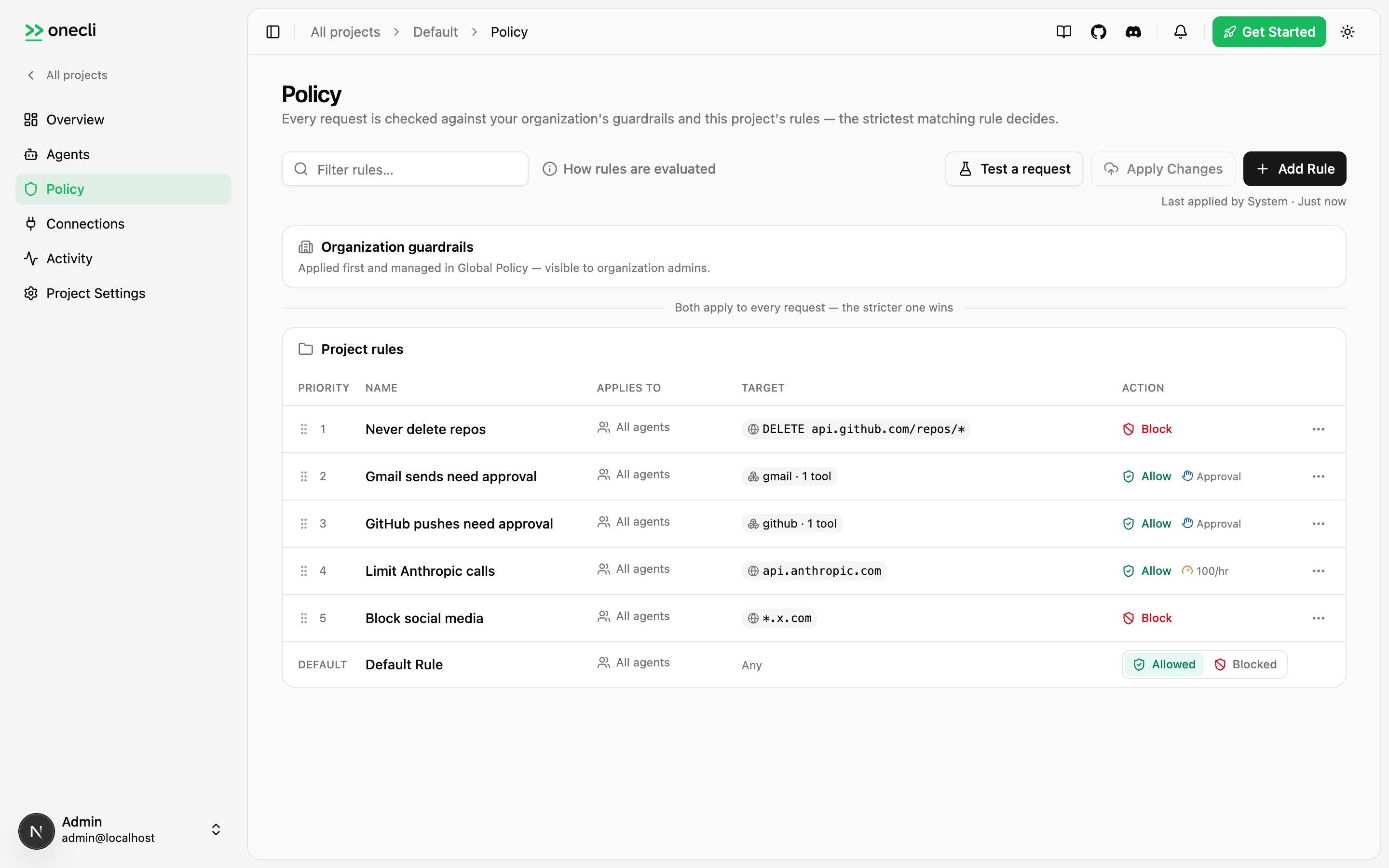
Anatomy of a rule
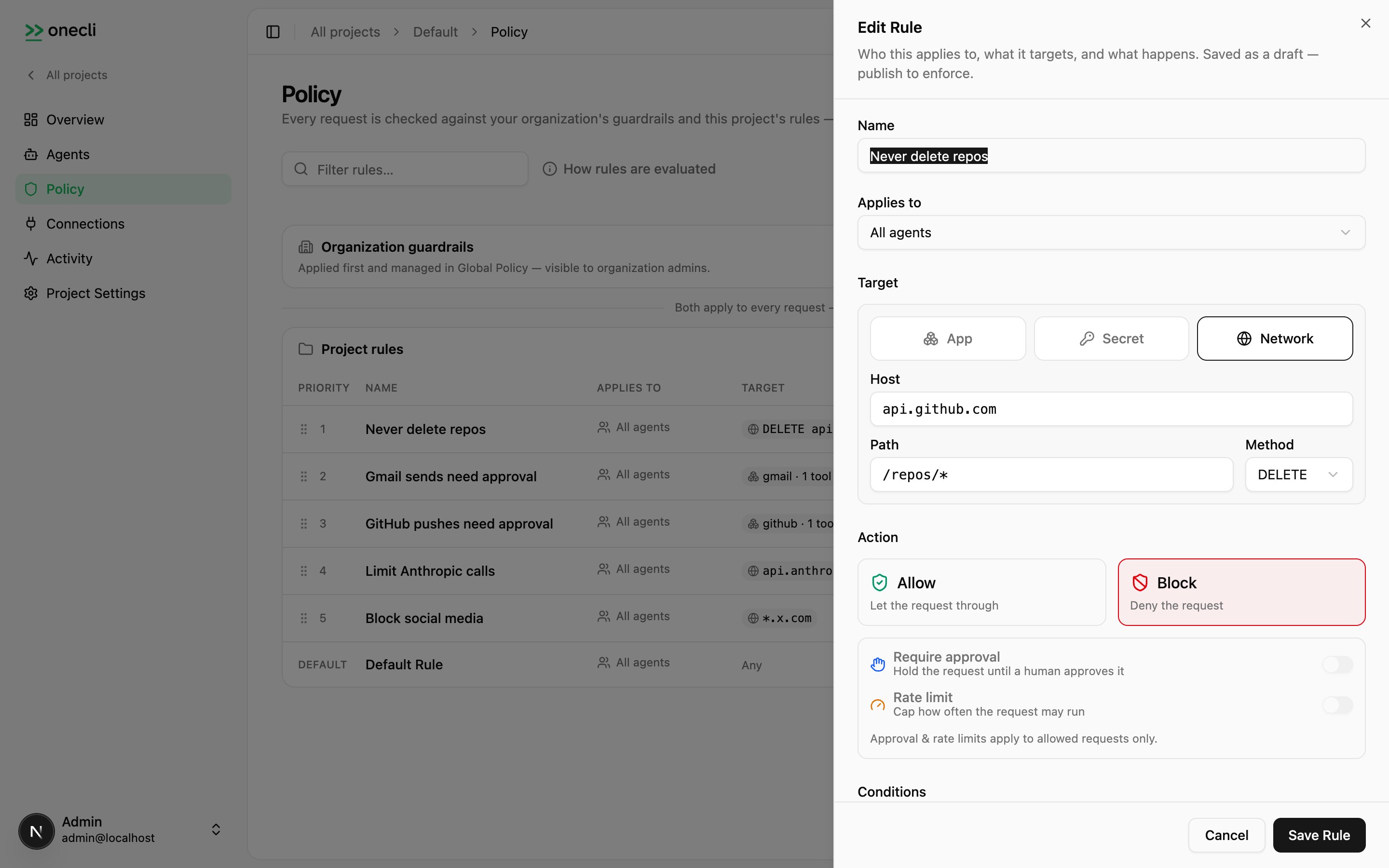
A rule pairs who (identities) with what (targets), and applies an action with optional modifiers.- Identities: who the rule applies to — specific users or user groups. Empty means everyone in the organization.
- Targets: at least one destination:
- an app (
{"kind":"app","provider":"gmail","tools":["send_email"]}), optionally narrowed to specific catalog tools, or the whole app whentoolsis omitted; - a connection (
{"kind":"connection","connectionId":"..."}): one specific connected account; - a secret (
{"kind":"secret","secretId":"..."}): a stored credential and its host; - a network pattern (
{"kind":"network","hostPattern":"api.example.com","pathPattern":"/v1/*","method":"POST"}).
- an app (
- Action:
alloworblock. - Modifiers (allow rules only):
requireApprovalholds matching requests for a human decision;rateLimitplusrateLimitWindowcap usage, with each agent tracking its own counter.
Creating rules
Organization rules require an organization API key (oc_org_…) with the admin role. From the console: Policy → Add Rule. From the CLI:
publishSkipped appears in the output) so you never accidentally ship a teammate’s half-finished edits. Review with onecli org policy status, then onecli org policy publish, or pass --publish-all. Use --no-publish to stage deliberately.
The same rule via the API (organization scope — no X-Project-Id):
POST /v1/org/policy/publish, or Apply Changes in the console. Read the enforced set with GET /v1/org/policy/rules?status=published, and compare draft against published rules by logicalId (published row ids regenerate on every publish).
Examples
Block a destructive operation everywhere (applies to every project and agent):read_all and write_all where the app supports them). Output abridged to a few tools per group; the real catalog lists every tool:
Conditions
Conditions narrow a rule beyond its targets by inspecting the request body. Each condition names atarget (body), an operator (contains), a value, and an optional key to scope the match to one JSON field; multiple conditions are ANDed.
{"repositories": ["org/repo"]} (GitHub) or {"folders": ["/exports"]} (file providers), restricting which resources that connection can touch.
Manual approval
An allow rule withrequireApproval holds matching requests until a human decides — the same mechanism the Ask state in a per-tool grant uses. The gateway keeps the agent’s connection open (up to 5 minutes) while it waits; unanswered requests are denied. The reviewer sees the method and URL, sanitized headers, and a body preview, so they can judge exactly what the agent is trying to do.
Decisions flow through the console, or programmatically via the SDK:
App permissions and the ceiling
The per-app App Permissions panel at the organization level writes ordinary policy rules with anapp target — per-tool guardrails like “GitHub pushes need approval”, exactly like the examples above.
Whatever the organization sets is a ceiling for every project: a grant can allow a tool for an agent, but if an organization rule blocks it or requires approval, the strictest answer wins. In the project’s per-tool dialog those rows show as locked.
Read the effective per-tool state:
orgCeiling field — what the organization level alone would decide, independent of any grant.
How rules interact with credentials
Rules evaluate before credential injection. A blocked request is rejected at the gateway: the credential is never attached, and the upstream service never sees the request. Which credential is injected is decided by the agent’s grants.Availability
The organization policy console and/v1/org/policy/* API are available on OneCLI Cloud and self-hosted Enterprise.
On Community (OSS) and single-project deployments there is no organization level: agent grants are the whole policy surface — per-agent, per-tool access without a rules console on top.
The retired project-scope authoring surface (/v1/policy/rules writes, /v1/rules/*, /v1/org/rules/*) returns 410 Gone on current servers, pointing at grants (project access) or this page’s API (organization rules). See API errors for the full retirement inventory.
Coming soon
- Monitor action: log matching requests without blocking, useful for auditing before enforcing
- Time-bound access: grant access only during specific time windows