> ## Documentation Index
> Fetch the complete documentation index at: https://onecli.sh/docs/llms.txt
> Use this file to discover all available pages before exploring further.
# Bitwarden Vault: Sync Secrets to the Gateway
> Sync secrets from Bitwarden into OneCLI. Agents can access vault items without the Bitwarden CLI or direct API calls.
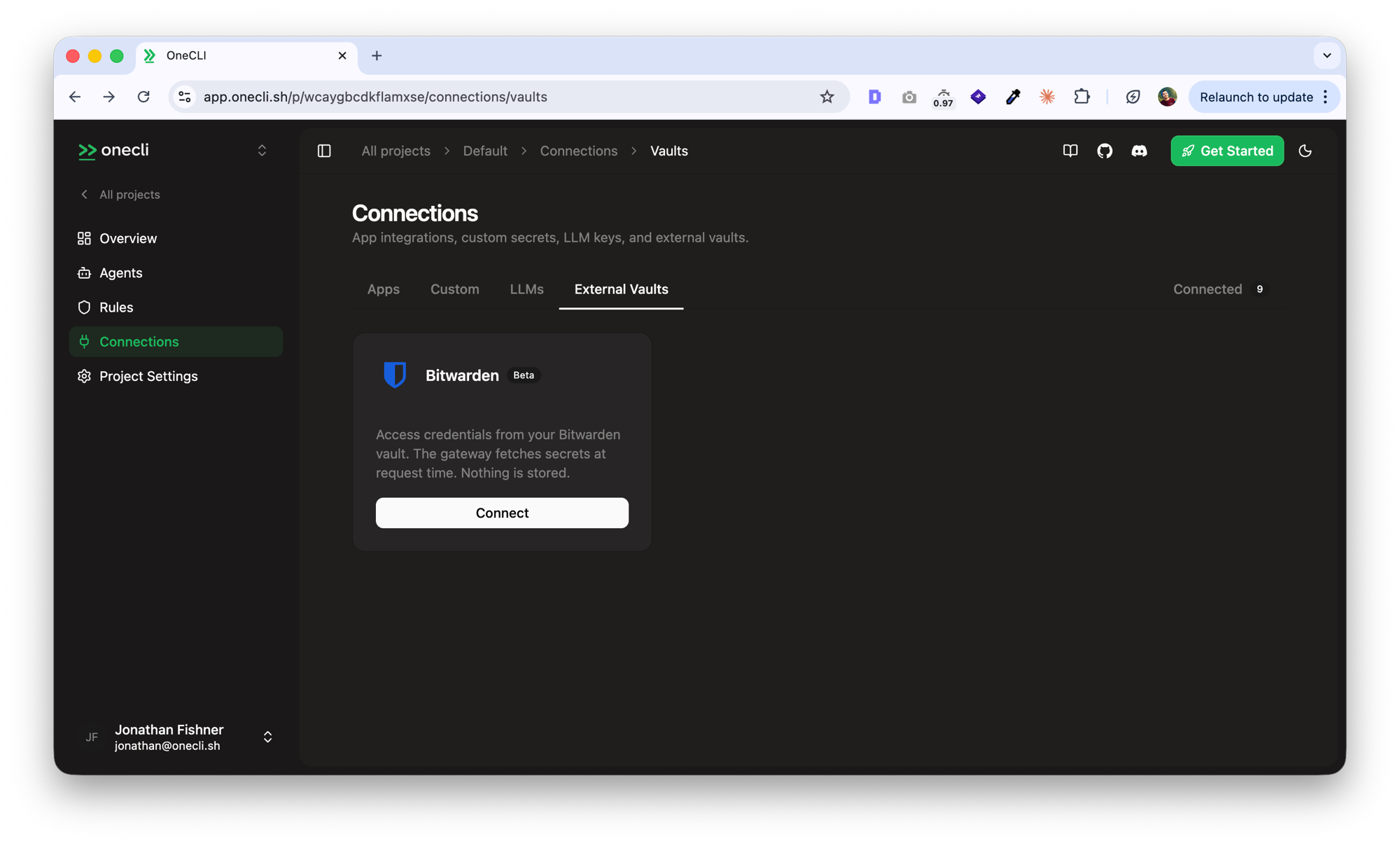
Connect your Bitwarden vault to OneCLI so the gateway can fetch credentials at request time, without storing them on the server. For an overview of all supported vault integrations, see [External Vaults](/docs/vaults/overview). Uses the [Bitwarden Agent Access SDK](https://github.com/bitwarden/agent-access) for encrypted communication.
 This integration is in beta. The Agent Access SDK is under active development, so some details can change between releases.
## Prerequisites
* OneCLI running locally or via Docker
* [Bitwarden Agent Access CLI](https://github.com/bitwarden/agent-access/releases) (`aac`) installed
* A Bitwarden account with credentials stored as login items
## Setup
Run the `aac` CLI to generate a pairing code:
```bash theme={null}
aac listen --psk
```
This prints a pairing code (two 64-character hex strings joined by `_`). Keep this terminal open.
Open the OneCLI dashboard > **Secrets** page > **Bitwarden Vault** card. Paste the pairing code and click **Connect Vault**.
The gateway establishes an encrypted Noise protocol session with your Bitwarden app through a WebSocket relay.
Make a request through the gateway with your agent's access token:
```bash theme={null}
curl -x http://x:YOUR_AGENT_TOKEN@localhost:10255 https://api.anthropic.com/v1/messages
```
If your Bitwarden vault has a login item with `api.anthropic.com` as the URI, the API key (stored in the password field) will be injected automatically.
## How credentials are matched
The gateway asks Bitwarden for credentials by domain. Bitwarden matches against the URI field of your vault items and returns the password field.
The injection rule depends on the target host:
| Host | Header | Format |
| ------------------- | --------------- | ---------------- |
| `api.anthropic.com` | `x-api-key` | Raw value |
| All other hosts | `Authorization` | `Bearer ` |
Store your API keys in the **password** field of Bitwarden login items. Set the URI to the API hostname (e.g. `api.anthropic.com`, `api.openai.com`).
## Session behavior
Sessions are restored automatically after a gateway restart. The first credential request triggers a reconnection using the stored session state from the database. There is no startup delay.
Sessions unused for 30 minutes are evicted from memory. The next request restores them automatically.
If a session can't be restored (e.g. the Bitwarden app was reinstalled), disconnect in the dashboard and pair again with a new code.
## Configuration
| Variable | Default | Description |
| --------------------- | --------------------------- | -------------------------------------------------------- |
| `BITWARDEN_PROXY_URL` | `wss://ap.lesspassword.dev` | WebSocket relay for the Bitwarden Remote Access protocol |
## Troubleshooting
Make sure the `aac listen --psk` terminal is still running and the pairing code hasn't expired. Generate a fresh code and try again.
The first request after restart triggers a lazy session restore. If it fails, the session state may be stale. Disconnect in the dashboard and re-pair.
The `aac` CLI may prompt you to approve credential requests from the gateway. Press `y` to allow. This is a security feature of the Bitwarden Agent Access protocol.
This integration is in beta. The Agent Access SDK is under active development, so some details can change between releases.
## Prerequisites
* OneCLI running locally or via Docker
* [Bitwarden Agent Access CLI](https://github.com/bitwarden/agent-access/releases) (`aac`) installed
* A Bitwarden account with credentials stored as login items
## Setup
Run the `aac` CLI to generate a pairing code:
```bash theme={null}
aac listen --psk
```
This prints a pairing code (two 64-character hex strings joined by `_`). Keep this terminal open.
Open the OneCLI dashboard > **Secrets** page > **Bitwarden Vault** card. Paste the pairing code and click **Connect Vault**.
The gateway establishes an encrypted Noise protocol session with your Bitwarden app through a WebSocket relay.
Make a request through the gateway with your agent's access token:
```bash theme={null}
curl -x http://x:YOUR_AGENT_TOKEN@localhost:10255 https://api.anthropic.com/v1/messages
```
If your Bitwarden vault has a login item with `api.anthropic.com` as the URI, the API key (stored in the password field) will be injected automatically.
## How credentials are matched
The gateway asks Bitwarden for credentials by domain. Bitwarden matches against the URI field of your vault items and returns the password field.
The injection rule depends on the target host:
| Host | Header | Format |
| ------------------- | --------------- | ---------------- |
| `api.anthropic.com` | `x-api-key` | Raw value |
| All other hosts | `Authorization` | `Bearer ` |
Store your API keys in the **password** field of Bitwarden login items. Set the URI to the API hostname (e.g. `api.anthropic.com`, `api.openai.com`).
## Session behavior
Sessions are restored automatically after a gateway restart. The first credential request triggers a reconnection using the stored session state from the database. There is no startup delay.
Sessions unused for 30 minutes are evicted from memory. The next request restores them automatically.
If a session can't be restored (e.g. the Bitwarden app was reinstalled), disconnect in the dashboard and pair again with a new code.
## Configuration
| Variable | Default | Description |
| --------------------- | --------------------------- | -------------------------------------------------------- |
| `BITWARDEN_PROXY_URL` | `wss://ap.lesspassword.dev` | WebSocket relay for the Bitwarden Remote Access protocol |
## Troubleshooting
Make sure the `aac listen --psk` terminal is still running and the pairing code hasn't expired. Generate a fresh code and try again.
The first request after restart triggers a lazy session restore. If it fails, the session state may be stale. Disconnect in the dashboard and re-pair.
The `aac` CLI may prompt you to approve credential requests from the gateway. Press `y` to allow. This is a security feature of the Bitwarden Agent Access protocol.