> ## Documentation Index
> Fetch the complete documentation index at: https://onecli.sh/docs/llms.txt
> Use this file to discover all available pages before exploring further.
# Policy Rules: Organization-Wide Guardrails
> Author organization allow/block rules with targets, rate limits, and approvals. Rules evaluate first-match, stage as a draft, and enforce on publish.
Policy rules are your organization's guardrails. They apply across every project and every agent: block operations, require human approval, or cap usage, all in one ordered list your whole team can read. Per-agent access within a project is managed with [agent grants](/docs/guides/agent-access) — rules are the level above, and no grant can loosen them.
## Why rules matter
Credentials get an agent through the door. Rules decide what it can do once inside.
Without guardrails, an agent granted Gmail can read, send, and delete emails with no limit. That's useful, but it's also how you get an agent mass-deleting an inbox before anyone can stop it. Rules let you say things like "in this organization, deleting repositories is never allowed" — once, for everyone.
### Deterministic enforcement, not prompts
You can tell an agent "never delete emails without my approval" in a system prompt. But a prompt is a suggestion, not a guarantee. Agents are non-deterministic. They can be manipulated through prompt injection, they can misinterpret instructions, or they can be too eager to please and take actions you didn't intend.
Rules are different. They're enforced outside the agent, at the gateway level, before the request ever reaches the external service. If a rule blocks Gmail deletes, that request is blocked. Every time, deterministically, regardless of what the agent was told or tricked into doing.
## How the policy engine works
Every request an agent makes passes through the gateway, which evaluates rules **top-down, first match wins**:
1. **Organization rules** run first: org-wide guardrails an individual project cannot loosen. This is the level you author on this page.
2. **Project-level access** runs next — compiled automatically from each agent's [grants](/docs/guides/agent-access). You never author project rules directly; attaching a connection or secret writes them for you.
3. Each level ends in a **Default Rule**, which decides what happens when nothing matched (Allow or Block).
A request is allowed only when **both** levels permit it. The first rule whose identities and targets match decides; later rules never run, so order matters (drag rules in the console, or reorder via the API).
### Rules vs grants
| | Organization rules | Agent grants |
| ------------ | ------------------------------------ | ------------------------------------ |
| Scope | Every project and agent | One agent, one credential |
| Direction | Ceiling — can only restrict | Grant — provides access |
| Authored | Policy console / `onecli org policy` | Agent pages / `onecli agents grants` |
| Takes effect | On publish (staged draft) | Immediately |
| Identities | Users, user groups, or everyone | The one agent |
### Draft and publish
Organization rule edits never take effect immediately. Changes stage into a **draft**; the gateway keeps enforcing the last **published** set until you click **Apply Changes** (or call the publish API). Publishing snapshots the *entire* draft (including changes staged by teammates), so review the pending list before applying.
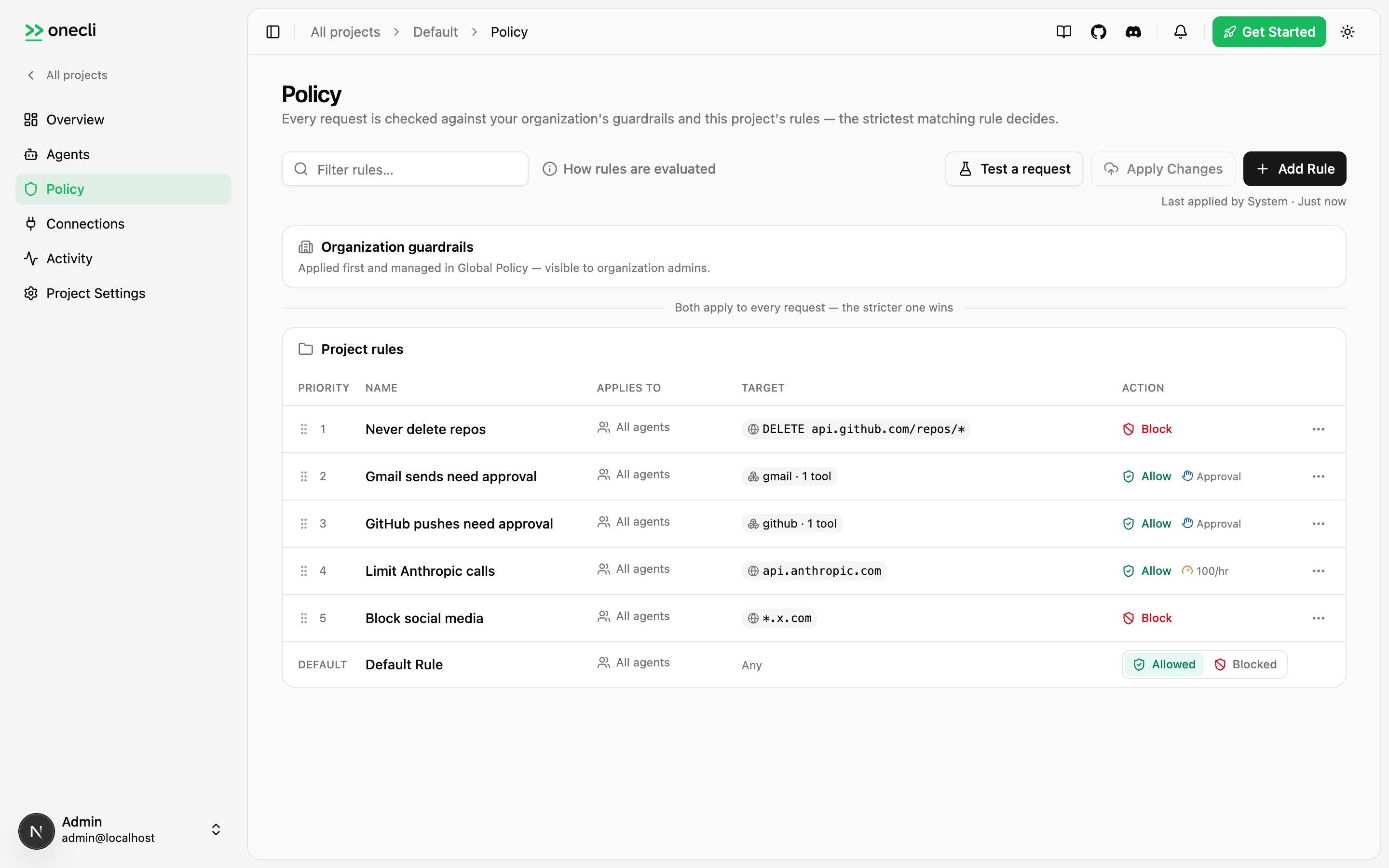 ## Anatomy of a rule
A rule pairs **who** (identities) with **what** (targets), and applies an **action** with optional modifiers.
* **Identities**: who the rule applies to — specific users or user groups. Empty means everyone in the organization.
* **Targets**: at least one destination:
* an **app** (`{"kind":"app","provider":"gmail","tools":["send_email"]}`), optionally narrowed to specific catalog tools, or the whole app when `tools` is omitted;
* a **connection** (`{"kind":"connection","connectionId":"..."}`): one specific connected account;
* a **secret** (`{"kind":"secret","secretId":"..."}`): a stored credential and its host;
* a **network** pattern (`{"kind":"network","hostPattern":"api.example.com","pathPattern":"/v1/*","method":"POST"}`).
* **Action**: `allow` or `block`.
* **Modifiers** (allow rules only): `requireApproval` holds matching requests for a human decision; `rateLimit` plus `rateLimitWindow` cap usage, with each agent tracking its own counter.
## Anatomy of a rule
A rule pairs **who** (identities) with **what** (targets), and applies an **action** with optional modifiers.
* **Identities**: who the rule applies to — specific users or user groups. Empty means everyone in the organization.
* **Targets**: at least one destination:
* an **app** (`{"kind":"app","provider":"gmail","tools":["send_email"]}`), optionally narrowed to specific catalog tools, or the whole app when `tools` is omitted;
* a **connection** (`{"kind":"connection","connectionId":"..."}`): one specific connected account;
* a **secret** (`{"kind":"secret","secretId":"..."}`): a stored credential and its host;
* a **network** pattern (`{"kind":"network","hostPattern":"api.example.com","pathPattern":"/v1/*","method":"POST"}`).
* **Action**: `allow` or `block`.
* **Modifiers** (allow rules only): `requireApproval` holds matching requests for a human decision; `rateLimit` plus `rateLimitWindow` cap usage, with each agent tracking its own counter.
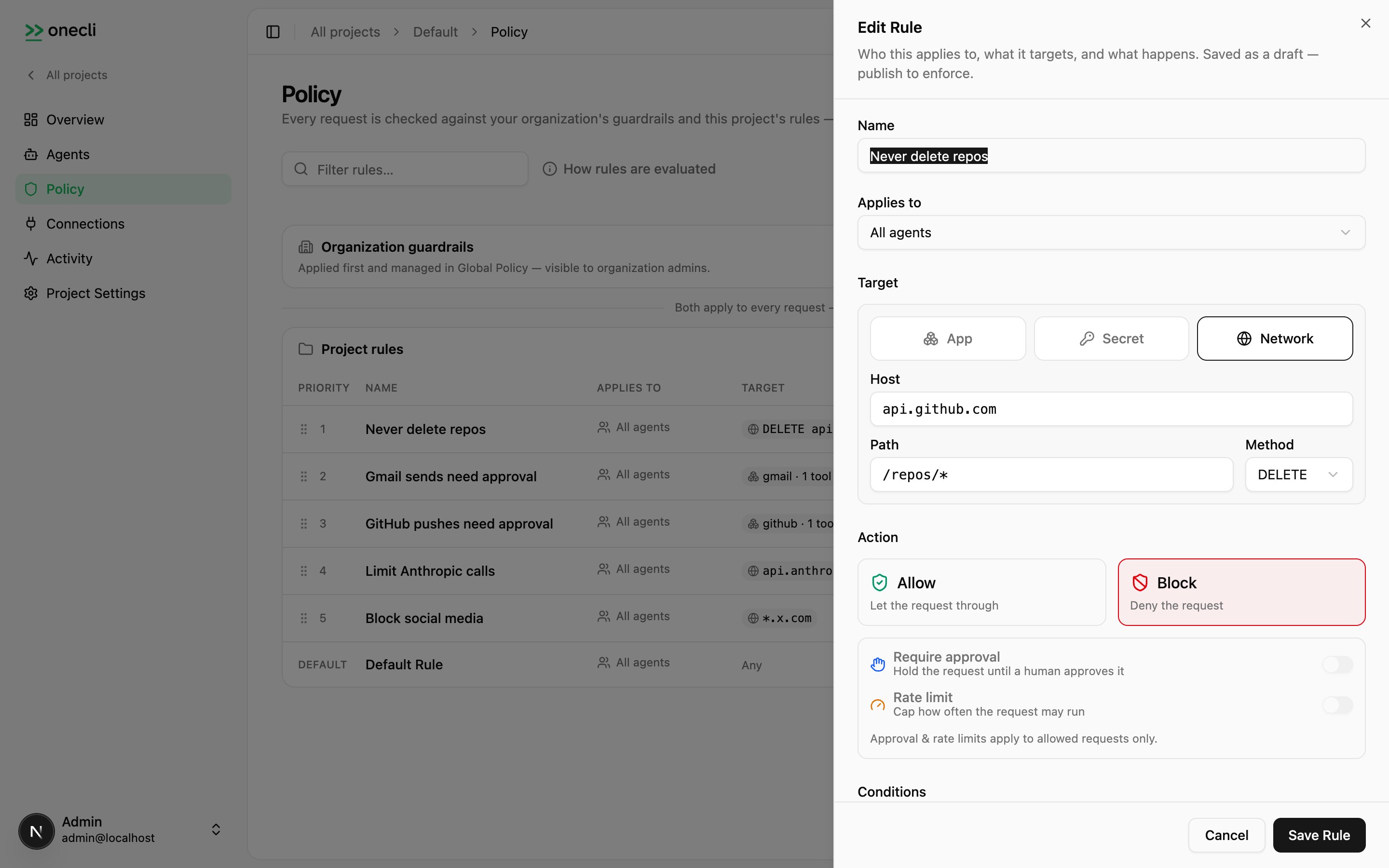 ## Creating rules
Organization rules require an organization API key (`oc_org_…`) with the admin role. From the console: **Policy → Add Rule**. From the CLI:
```bash theme={null}
onecli org policy rules create \
--name "Gmail sends need approval" \
--action allow \
--targets '[{"kind":"app","provider":"gmail","tools":["send_email"]}]' \
--require-approval
```
```json theme={null}
{
"rule": {
"id": "9f2c1b8a",
"scope": "organization",
"status": "draft",
"generation": 0,
"priority": 3,
"enabled": true,
"isDefault": false,
"logicalId": "b41a77c2",
"source": "custom",
"name": "Gmail sends need approval",
"description": null,
"action": "allow",
"rateLimit": null,
"rateLimitWindow": null,
"requireApproval": true,
"identities": [],
"targets": [{ "kind": "app", "provider": "gmail", "tools": ["send_email"] }],
"createdAt": "2026-07-21T09:15:00.000Z"
},
"published": true,
"generation": 7
}
```
CLI writes **auto-publish when the draft has no other staged changes**; otherwise the publish is withheld (`publishSkipped` appears in the output) so you never accidentally ship a teammate's half-finished edits. Review with `onecli org policy status`, then `onecli org policy publish`, or pass `--publish-all`. Use `--no-publish` to stage deliberately.
The same rule via the API (organization scope — no `X-Project-Id`):
```bash theme={null}
curl -X POST https://api.onecli.sh/v1/org/policy/rules \
-H "Authorization: Bearer $ONECLI_ORG_API_KEY" \
-H "Content-Type: application/json" \
-d '{
"name": "Gmail sends need approval",
"action": "allow",
"requireApproval": true,
"targets": [{"kind":"app","provider":"gmail","tools":["send_email"]}]
}'
```
Then make it enforce with `POST /v1/org/policy/publish`, or **Apply Changes** in the console. Read the enforced set with `GET /v1/org/policy/rules?status=published`, and compare draft against published rules by `logicalId` (published row ids regenerate on every publish).
## Examples
**Block a destructive operation everywhere** (applies to every project and agent):
```bash theme={null}
onecli org policy rules create \
--name "Never delete repos" \
--action block \
--targets '[{"kind":"network","hostPattern":"api.github.com","pathPattern":"/repos/*","method":"DELETE"}]'
```
```json theme={null}
{
"rule": {
"id": "c81f3a20",
"scope": "organization",
"status": "draft",
"generation": 0,
"priority": 0,
"enabled": true,
"isDefault": false,
"logicalId": "e63d09b7",
"source": "custom",
"name": "Never delete repos",
"description": null,
"action": "block",
"rateLimit": null,
"rateLimitWindow": null,
"requireApproval": false,
"identities": [],
"targets": [
{
"kind": "network",
"hostPattern": "api.github.com",
"pathPattern": "/repos/*",
"method": "DELETE"
}
],
"createdAt": "2026-07-21T09:20:00.000Z"
},
"published": true,
"generation": 3
}
```
**Cap an expensive API** (allow plus a rate limit; each agent gets its own counter):
```bash theme={null}
onecli org policy rules create \
--name "Limit Anthropic calls" \
--action allow \
--targets '[{"kind":"network","hostPattern":"api.anthropic.com"}]' \
--rate-limit 100 --rate-limit-window hour
```
```json theme={null}
{
"rule": {
"id": "1d40b7ce",
"scope": "organization",
"status": "draft",
"generation": 0,
"priority": 4,
"enabled": true,
"isDefault": false,
"logicalId": "a90c55f1",
"source": "custom",
"name": "Limit Anthropic calls",
"description": null,
"action": "allow",
"rateLimit": 100,
"rateLimitWindow": "hour",
"requireApproval": false,
"identities": [],
"targets": [{ "kind": "network", "hostPattern": "api.anthropic.com" }],
"createdAt": "2026-07-21T09:22:00.000Z"
},
"published": true,
"generation": 8
}
```
**Scope one agent's access** — that's a grant, not a rule. To give an agent read-only Gmail, attach the connection with only the read tools allowed:
```bash theme={null}
onecli agents grants attach-connection --id agent_abc123 --connection-id conn_9f2c1b \
--allow read_all
```
See [Agent access](/docs/guides/agent-access) for the full grant model.
Discover an app's tool ids (including group wildcards like `read_all` and `write_all` where the app supports them). Output abridged to a few tools per group; the real catalog lists every tool:
```bash theme={null}
onecli apps permission-definition --provider gmail --fields groups
```
```json theme={null}
{
"groups": [
{
"category": "read",
"tools": [
{ "id": "search_messages", "name": "Search messages", "description": "Search and list messages matching a query" },
{ "id": "get_message", "name": "Read message", "description": "Retrieve a specific email message" }
],
"wildcard": {
"id": "read_all",
"name": "All read operations",
"description": "Search, read, and list emails, threads, drafts, labels, and settings"
}
},
{
"category": "write",
"tools": [
{ "id": "send_email", "name": "Send email", "description": "Send email on your behalf" }
],
"wildcard": {
"id": "write_all",
"name": "All write operations",
"description": "Send, import, create drafts, modify labels, trash, and delete emails and threads"
}
}
]
}
```
## Conditions
Conditions narrow a rule beyond its targets by inspecting the request body. Each condition names a `target` (`body`), an `operator` (`contains`), a `value`, and an optional `key` to scope the match to one JSON field; multiple conditions are ANDed.
```bash theme={null}
onecli org policy rules create \
--name "Approve large charges" \
--action allow --require-approval \
--targets '[{"kind":"network","hostPattern":"api.stripe.com","pathPattern":"/v1/charges","method":"POST"}]' \
--conditions '[{"target":"body","operator":"contains","value":"10000","key":"amount"}]'
```
```json theme={null}
{
"rule": {
"id": "5e8c02af",
"scope": "organization",
"status": "draft",
"generation": 0,
"priority": 6,
"enabled": true,
"isDefault": false,
"logicalId": "d24f18e0",
"source": "custom",
"name": "Approve large charges",
"description": null,
"action": "allow",
"rateLimit": null,
"rateLimitWindow": null,
"requireApproval": true,
"conditions": [
{ "target": "body", "operator": "contains", "value": "10000", "key": "amount" }
],
"identities": [],
"targets": [
{
"kind": "network",
"hostPattern": "api.stripe.com",
"pathPattern": "/v1/charges",
"method": "POST"
}
],
"createdAt": "2026-07-21T09:26:00.000Z"
},
"published": true,
"generation": 10
}
```
Allow rules with a single specific **connection** target instead accept a *session policy* object for resource scoping: `{"repositories": ["org/repo"]}` (GitHub) or `{"folders": ["/exports"]}` (file providers), restricting which resources that connection can touch.
## Manual approval
An allow rule with `requireApproval` holds matching requests until a human decides — the same mechanism the **Ask** state in a [per-tool grant](/docs/guides/agent-access#per-tool-access) uses. The gateway keeps the agent's connection open (up to 5 minutes) while it waits; unanswered requests are denied. The reviewer sees the method and URL, sanitized headers, and a body preview, so they can judge exactly what the agent is trying to do.
Decisions flow through the console, or programmatically via the SDK:
```typescript theme={null}
const handle = onecli.configureManualApproval(async (request) => {
console.log(`${request.method} ${request.url}`);
return "approve"; // or "deny"
});
```
See the [Node SDK reference](/docs/sdks/node#manual-approval) for the org-wide variant.
## App permissions and the ceiling
The per-app **App Permissions** panel at the organization level writes ordinary policy rules with an `app` target — per-tool guardrails like "GitHub pushes need approval", exactly like the examples above.
Whatever the organization sets is a **ceiling** for every project: a [grant](/docs/guides/agent-access) can allow a tool for an agent, but if an organization rule blocks it or requires approval, the strictest answer wins. In the project's per-tool dialog those rows show as locked.
Read the effective per-tool state:
```bash theme={null}
# The organization level alone (admin, org key)
curl "https://api.onecli.sh/v1/org/policy/effective-app-permissions?provider=gmail" \
-H "Authorization: Bearer $ONECLI_ORG_API_KEY"
# One project's enforced result (grants + organization rules combined)
curl "https://api.onecli.sh/v1/policy/effective-app-permissions?provider=gmail" \
-H "Authorization: Bearer $ONECLI_API_KEY" \
-H "X-Project-Id: $PROJECT_ID"
```
Each tool in the project view carries an `orgCeiling` field — what the organization level alone would decide, independent of any grant.
## How rules interact with credentials
Rules evaluate **before** credential injection. A blocked request is rejected at the gateway: the credential is never attached, and the upstream service never sees the request. Which credential is injected is decided by the agent's [grants](/docs/guides/agent-access).
## Availability
The organization policy console and `/v1/org/policy/*` API are available on OneCLI Cloud and self-hosted Enterprise.
On Community (OSS) and single-project deployments there is no organization level: agent [grants](/docs/guides/agent-access) are the whole policy surface — per-agent, per-tool access without a rules console on top.
The retired project-scope authoring surface (`/v1/policy/rules` writes, `/v1/rules/*`, `/v1/org/rules/*`) returns `410 Gone` on current servers, pointing at grants (project access) or this page's API (organization rules). See [API errors](/docs/api-reference/errors) for the full retirement inventory.
## Coming soon
* **Monitor action**: log matching requests without blocking, useful for auditing before enforcing
* **Time-bound access**: grant access only during specific time windows
## Creating rules
Organization rules require an organization API key (`oc_org_…`) with the admin role. From the console: **Policy → Add Rule**. From the CLI:
```bash theme={null}
onecli org policy rules create \
--name "Gmail sends need approval" \
--action allow \
--targets '[{"kind":"app","provider":"gmail","tools":["send_email"]}]' \
--require-approval
```
```json theme={null}
{
"rule": {
"id": "9f2c1b8a",
"scope": "organization",
"status": "draft",
"generation": 0,
"priority": 3,
"enabled": true,
"isDefault": false,
"logicalId": "b41a77c2",
"source": "custom",
"name": "Gmail sends need approval",
"description": null,
"action": "allow",
"rateLimit": null,
"rateLimitWindow": null,
"requireApproval": true,
"identities": [],
"targets": [{ "kind": "app", "provider": "gmail", "tools": ["send_email"] }],
"createdAt": "2026-07-21T09:15:00.000Z"
},
"published": true,
"generation": 7
}
```
CLI writes **auto-publish when the draft has no other staged changes**; otherwise the publish is withheld (`publishSkipped` appears in the output) so you never accidentally ship a teammate's half-finished edits. Review with `onecli org policy status`, then `onecli org policy publish`, or pass `--publish-all`. Use `--no-publish` to stage deliberately.
The same rule via the API (organization scope — no `X-Project-Id`):
```bash theme={null}
curl -X POST https://api.onecli.sh/v1/org/policy/rules \
-H "Authorization: Bearer $ONECLI_ORG_API_KEY" \
-H "Content-Type: application/json" \
-d '{
"name": "Gmail sends need approval",
"action": "allow",
"requireApproval": true,
"targets": [{"kind":"app","provider":"gmail","tools":["send_email"]}]
}'
```
Then make it enforce with `POST /v1/org/policy/publish`, or **Apply Changes** in the console. Read the enforced set with `GET /v1/org/policy/rules?status=published`, and compare draft against published rules by `logicalId` (published row ids regenerate on every publish).
## Examples
**Block a destructive operation everywhere** (applies to every project and agent):
```bash theme={null}
onecli org policy rules create \
--name "Never delete repos" \
--action block \
--targets '[{"kind":"network","hostPattern":"api.github.com","pathPattern":"/repos/*","method":"DELETE"}]'
```
```json theme={null}
{
"rule": {
"id": "c81f3a20",
"scope": "organization",
"status": "draft",
"generation": 0,
"priority": 0,
"enabled": true,
"isDefault": false,
"logicalId": "e63d09b7",
"source": "custom",
"name": "Never delete repos",
"description": null,
"action": "block",
"rateLimit": null,
"rateLimitWindow": null,
"requireApproval": false,
"identities": [],
"targets": [
{
"kind": "network",
"hostPattern": "api.github.com",
"pathPattern": "/repos/*",
"method": "DELETE"
}
],
"createdAt": "2026-07-21T09:20:00.000Z"
},
"published": true,
"generation": 3
}
```
**Cap an expensive API** (allow plus a rate limit; each agent gets its own counter):
```bash theme={null}
onecli org policy rules create \
--name "Limit Anthropic calls" \
--action allow \
--targets '[{"kind":"network","hostPattern":"api.anthropic.com"}]' \
--rate-limit 100 --rate-limit-window hour
```
```json theme={null}
{
"rule": {
"id": "1d40b7ce",
"scope": "organization",
"status": "draft",
"generation": 0,
"priority": 4,
"enabled": true,
"isDefault": false,
"logicalId": "a90c55f1",
"source": "custom",
"name": "Limit Anthropic calls",
"description": null,
"action": "allow",
"rateLimit": 100,
"rateLimitWindow": "hour",
"requireApproval": false,
"identities": [],
"targets": [{ "kind": "network", "hostPattern": "api.anthropic.com" }],
"createdAt": "2026-07-21T09:22:00.000Z"
},
"published": true,
"generation": 8
}
```
**Scope one agent's access** — that's a grant, not a rule. To give an agent read-only Gmail, attach the connection with only the read tools allowed:
```bash theme={null}
onecli agents grants attach-connection --id agent_abc123 --connection-id conn_9f2c1b \
--allow read_all
```
See [Agent access](/docs/guides/agent-access) for the full grant model.
Discover an app's tool ids (including group wildcards like `read_all` and `write_all` where the app supports them). Output abridged to a few tools per group; the real catalog lists every tool:
```bash theme={null}
onecli apps permission-definition --provider gmail --fields groups
```
```json theme={null}
{
"groups": [
{
"category": "read",
"tools": [
{ "id": "search_messages", "name": "Search messages", "description": "Search and list messages matching a query" },
{ "id": "get_message", "name": "Read message", "description": "Retrieve a specific email message" }
],
"wildcard": {
"id": "read_all",
"name": "All read operations",
"description": "Search, read, and list emails, threads, drafts, labels, and settings"
}
},
{
"category": "write",
"tools": [
{ "id": "send_email", "name": "Send email", "description": "Send email on your behalf" }
],
"wildcard": {
"id": "write_all",
"name": "All write operations",
"description": "Send, import, create drafts, modify labels, trash, and delete emails and threads"
}
}
]
}
```
## Conditions
Conditions narrow a rule beyond its targets by inspecting the request body. Each condition names a `target` (`body`), an `operator` (`contains`), a `value`, and an optional `key` to scope the match to one JSON field; multiple conditions are ANDed.
```bash theme={null}
onecli org policy rules create \
--name "Approve large charges" \
--action allow --require-approval \
--targets '[{"kind":"network","hostPattern":"api.stripe.com","pathPattern":"/v1/charges","method":"POST"}]' \
--conditions '[{"target":"body","operator":"contains","value":"10000","key":"amount"}]'
```
```json theme={null}
{
"rule": {
"id": "5e8c02af",
"scope": "organization",
"status": "draft",
"generation": 0,
"priority": 6,
"enabled": true,
"isDefault": false,
"logicalId": "d24f18e0",
"source": "custom",
"name": "Approve large charges",
"description": null,
"action": "allow",
"rateLimit": null,
"rateLimitWindow": null,
"requireApproval": true,
"conditions": [
{ "target": "body", "operator": "contains", "value": "10000", "key": "amount" }
],
"identities": [],
"targets": [
{
"kind": "network",
"hostPattern": "api.stripe.com",
"pathPattern": "/v1/charges",
"method": "POST"
}
],
"createdAt": "2026-07-21T09:26:00.000Z"
},
"published": true,
"generation": 10
}
```
Allow rules with a single specific **connection** target instead accept a *session policy* object for resource scoping: `{"repositories": ["org/repo"]}` (GitHub) or `{"folders": ["/exports"]}` (file providers), restricting which resources that connection can touch.
## Manual approval
An allow rule with `requireApproval` holds matching requests until a human decides — the same mechanism the **Ask** state in a [per-tool grant](/docs/guides/agent-access#per-tool-access) uses. The gateway keeps the agent's connection open (up to 5 minutes) while it waits; unanswered requests are denied. The reviewer sees the method and URL, sanitized headers, and a body preview, so they can judge exactly what the agent is trying to do.
Decisions flow through the console, or programmatically via the SDK:
```typescript theme={null}
const handle = onecli.configureManualApproval(async (request) => {
console.log(`${request.method} ${request.url}`);
return "approve"; // or "deny"
});
```
See the [Node SDK reference](/docs/sdks/node#manual-approval) for the org-wide variant.
## App permissions and the ceiling
The per-app **App Permissions** panel at the organization level writes ordinary policy rules with an `app` target — per-tool guardrails like "GitHub pushes need approval", exactly like the examples above.
Whatever the organization sets is a **ceiling** for every project: a [grant](/docs/guides/agent-access) can allow a tool for an agent, but if an organization rule blocks it or requires approval, the strictest answer wins. In the project's per-tool dialog those rows show as locked.
Read the effective per-tool state:
```bash theme={null}
# The organization level alone (admin, org key)
curl "https://api.onecli.sh/v1/org/policy/effective-app-permissions?provider=gmail" \
-H "Authorization: Bearer $ONECLI_ORG_API_KEY"
# One project's enforced result (grants + organization rules combined)
curl "https://api.onecli.sh/v1/policy/effective-app-permissions?provider=gmail" \
-H "Authorization: Bearer $ONECLI_API_KEY" \
-H "X-Project-Id: $PROJECT_ID"
```
Each tool in the project view carries an `orgCeiling` field — what the organization level alone would decide, independent of any grant.
## How rules interact with credentials
Rules evaluate **before** credential injection. A blocked request is rejected at the gateway: the credential is never attached, and the upstream service never sees the request. Which credential is injected is decided by the agent's [grants](/docs/guides/agent-access).
## Availability
The organization policy console and `/v1/org/policy/*` API are available on OneCLI Cloud and self-hosted Enterprise.
On Community (OSS) and single-project deployments there is no organization level: agent [grants](/docs/guides/agent-access) are the whole policy surface — per-agent, per-tool access without a rules console on top.
The retired project-scope authoring surface (`/v1/policy/rules` writes, `/v1/rules/*`, `/v1/org/rules/*`) returns `410 Gone` on current servers, pointing at grants (project access) or this page's API (organization rules). See [API errors](/docs/api-reference/errors) for the full retirement inventory.
## Coming soon
* **Monitor action**: log matching requests without blocking, useful for auditing before enforcing
* **Time-bound access**: grant access only during specific time windows